Garmin vivoactive 5 Review: Worth It? (October 2026)
Our Garmin vivoactive 5 review finds it a strong fit for everyday fitness and sleep tracking, especially if you want stored music and fewer charging breaks. Choose the Forerunner 165 instead if adaptive running workouts and race plans lead your wish list.
On this page (11 sections)
- Garmin vivoactive 5 review at a glance
- What do the activity and sleep tools show?
- How does the vivoactive 5 handle mixed workouts?
- How long does the battery last in everyday use?
- Is the vivoactive 5 or Forerunner 165 better for running?
- Does the vivoactive 6 offer a useful upgrade?
- Should iPhone users choose the Garmin vivoactive 5?
- How should you set up the vivoactive 5?
- What care habits and common mistakes matter most?
- Do you need a Garmin subscription?
- Garmin vivoactive 5 review: which watch should you choose?
Our Garmin vivoactive 5 review recommends it for everyday fitness and sleep tracking, especially if your week mixes walking, gym sessions and occasional runs. Stored music and a flexible charging schedule make it a practical choice for people who want to wear a watch overnight.
The main buying question is how much guidance you need. The vivoactive 5 covers varied exercise, while the Forerunner 165 puts run planning first and the vivoactive 6 adds more workout guidance.
Garmin vivoactive 5 review at a glance
The vivoactive 5 is a strong general fitness choice because it brings activity, rest and recovery information together. Its 8.7 score reflects that fit for a varied daily routine.
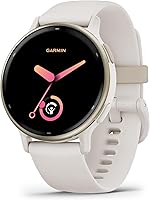
Garmin vivoactive 5 42mm: Best for daily activity tracking

- 42mm case
- AMOLED display
- Stored music
Choose this Garmin for a routine that mixes daily activity, sleep tracking and several types of exercise. Stored music also makes it useful for workouts with wireless headphones.
Pros
- Sleep coaching and automatic nap detection
- Wheelchair mode with push tracking
- Music storage for phone-free listening
Cons
- Always-on display reduces stated battery life
- Race-focused runners may prefer the Forerunner 165
The 42mm watch has an AMOLED touchscreen, a silicone band and a fiber-reinforced polymer case. Check comfort as carefully as screen appeal, since a watch you remove every night cannot build a useful overnight record.
Its main appeal is the connection between your habits. You can review a busy day, a short night and your next workout together instead of judging progress only by steps or exercise totals.
Who should choose the Garmin vivoactive 5?
Choose it if you want one watch for several activities and don't need every workout centered on a race. It fits someone who walks during the week, does strength sessions and runs when time allows.
It also suits people who want stored music during exercise. Wireless headphones let you listen without carrying your phone, though that benefit is separate from phone-dependent notifications.
Who should skip this Garmin vivoactive 5 review pick?
Choose another watch if your top priority is adaptive run scheduling, wrist-based calls or animated exercise guidance. Those needs point toward different alternatives discussed below.
Also reconsider if you dislike wearing anything to bed. Sleep tools are a major part of this watch's appeal, so leaving it on a nightstand removes much of the reason to choose it.
What do the activity and sleep tools show?
The vivoactive 5 brings together sleep records, naps and daily activity. Its sleep and activity figures are estimates, so compare them across similar days rather than treating each number as exact.
Sleep coaching, a sleep score and automatic nap detection organize your overnight and daytime rest records. You can review these alongside your workouts to see how sleep and exercise fit into your week.
The useful approach is to compare similar days over time. Look at bedtime, recorded sleep duration and workout timing to see how consistent your routine is rather than chasing a single score.
You also get a morning report, activity goals and a record of your completed workouts. Start with the information that serves a clear goal instead of checking every metric each morning.
A single sleep score offers only a small part of your weekly record. Focus on consistent wear and a comfortable fit so you have comparable nights to review.
How does the vivoactive 5 handle mixed workouts?
The vivoactive 5 suits a varied exercise week, with more than 30 built-in indoor and GPS sports apps. These include walking, running, cycling, HIIT, swimming and golf.
Preloaded workouts cover cardio, yoga, strength, HIIT and Pilates. You can create your own workouts in Garmin Connect or use Garmin Coach free adaptive training plans for a running goal.
Workout benefit summarizes a session's training focus, while recovery time provides an estimated interval between harder efforts. Use that information alongside your schedule rather than turning every available day into another demanding session.
Choose the activity profile that matches your session before starting. Recording everything under one convenient profile makes your exercise history less useful when you want to compare similar workouts.
Wheelchair mode tracks pushes rather than steps and includes push and handcycle activities, adapted workouts and challenges. For wheelchair users, this is a concrete reason to consider the watch beyond general activity tracking.
How long does the battery last in everyday use?
Garmin states up to 11 days in smartwatch mode, or up to 5 days with the display always-on. Choose the display behavior you prefer before deciding whether the charging schedule fits your week.
Always-on suits people who want the time visible at a glance. If longer gaps between charges matter more, leaving the display off when unused is the clearer choice.
Neither figure is a promise for every mix of features and workouts. GPS recording, music playback and screen use are demands to consider when planning around a long outing.
Pick a repeatable charging window when you normally remove the watch, such as while getting ready. This makes more sense for sleep tracking than waiting until bedtime and discovering you need a charge.
The smartwatch battery life guide explains how to read these estimates. Leave extra room before travel rather than planning around the maximum figure.
Is the vivoactive 5 or Forerunner 165 better for running?
Choose the Forerunner 165 for structured run training and the vivoactive 5 for a broader fitness routine. The important difference is the guidance you want between runs, not simply whether a watch can record one.
The Forerunner's daily suggested workouts adapt to performance and recovery, and its race adaptive plans support event preparation. Training effect labels explain a workout's main benefit, while button controls sit alongside the touchscreen.
That combination suits someone who wants a clearer answer to “what should my next run be?” It is less compelling if you already follow a plan elsewhere and mainly need a record of your sessions.
The vivoactive 5 still makes sense for recreational running within a mixed week. Its Coach plans and recovery information can serve a goal without making running the main reason you wear the watch.
Our Garmin Forerunner 165 vs vivoactive 5 comparison covers this choice more closely. The best Garmin watches guide helps if neither approach matches your priorities.
Does the vivoactive 6 offer a useful upgrade?
Choose the vivoactive 6 if guided workouts or walking suggestions would help you exercise more consistently. A larger activity menu matters only when it includes something you will use.
Its animated workouts cover cardio, yoga, strength, HIIT and Pilates, while daily suggested walking workouts provide direction for a walking routine. It also adds a smart wake alarm that uses vibration.
The vivoactive 6 shares the same stated smartwatch-mode battery ceiling as the vivoactive 5. Buying the newer model therefore isn't a clear route to longer time between charges.
For a first watch, write down the activities and guidance you need, then compare against that list. For an existing vivoactive 5 user, extra features justify a change only if they solve a problem in the current routine.
Workout animations provide a visual reference for movements during a session. Consider whether you would use instructions on a small wrist display or prefer following a workout on your phone.
Should iPhone users choose the Garmin vivoactive 5?
Choose the vivoactive 5 with an iPhone if fitness tracking and overnight wear matter most. Choose the Apple Watch SE 3 GPS 40mm if sending texts and taking calls are central to your plans.
The vivoactive 5 supports iOS and Android smartphones and shows notifications when paired. Receiving an alert is a different need from carrying out a conversation on your wrist, so decide which behavior you expect.
Apple states up to 18 hours of battery life for the SE 3, making a regular charging window more important. Its fast charging can provide up to 8 hours of battery in 15 minutes, which helps when your routine includes short top-ups.
That makes the Apple alternative suitable for an iPhone user willing to plan around frequent charging. Skip it if your main reason for changing watches is to reduce charging interruptions.
Read whether Garmin watches work with iPhone for pairing questions. Our Apple Watch vs Garmin guide covers the broader daily-use choice.
How should you set up the vivoactive 5?
Set up pairing, fit and essential features first, then add extras once the basics work. A short, focused setup is easier to manage than enabling every available alert.
- Pair through Garmin Connect. Follow the setup prompts and allow the permissions needed for the functions you want.
- Adjust the band. Aim for a secure fit without digging into your skin, and check comfort with your wrist bent.
- Choose useful notifications. Keep alerts that deserve an interruption and limit ones you would ignore.
- Arrange your activity choices. Put your regular workouts within easy reach so starting the correct session becomes a habit.
- Prepare music before going out. Connect your account, download what you want and confirm your headphones connect.
- Choose a charging window. Leave the watch ready for bedtime if sleep tracking is a priority.
Record a short, familiar activity before relying on the watch for an important session. Confirm that you can start, stop and save it without having to learn the controls mid-workout.
For more help defining your needs before setup or buying, use our guide to what to look for in a smartwatch.
What care habits and common mistakes matter most?
Keep the band, skin and charging contacts clean and dry. Sweat and trapped moisture can make a watch uncomfortable even when the initial fit feels right.
Follow the watch's care instructions after sweaty sessions or swimming. Dry the watch before charging, avoid harsh cleaners and inspect the cable and contacts if charging becomes unreliable.
Don't tighten the band excessively to chase better readings. A comfortable, steady fit is more useful than one that leaves you wanting to remove the watch halfway through the day.
Avoid changing your whole routine because of one unusual metric. Consistent wear and comparable days make trends easier to interpret than scattered readings from different conditions.
Don't confuse downloaded music with full independence from a phone. Work out which connected features you need before deciding to leave your phone behind.
If staying connected is a concern, our guide to whether smartwatches need a phone explains the distinction between recording activities and using connected services.
Do you need a Garmin subscription?
Garmin Coach adaptive training plans are free for the vivoactive 5. Music accounts are a separate consideration, so check the requirements for the service you plan to use.
Spotify, Amazon Music and Deezer playlist support doesn't remove account requirements or service terms. Set up downloads before your first phone-free workout rather than assuming a familiar playlist is already on the watch.
Garmin Pay is another feature to check against your actual needs. Confirm support for your payment setup before counting on leaving your cards at home.
Our guide to whether Garmin watches have a monthly fee helps separate watch features from optional services. Decide on those services before building them into your buying decision.
Garmin vivoactive 5 review: which watch should you choose?
Choose the vivoactive 5 if mixed exercise, sleep patterns and stored music cover your main needs. It is the clearest fit here for someone seeking daily fitness support without making race preparation the priority.
Choose the Forerunner 165 if you want the watch to guide your running schedule. Choose the vivoactive 6 if walking suggestions or animated workouts would give you direction you currently lack.
The Apple Watch SE 3 GPS 40mm suits iPhone users who place calls and messages higher on their list and can make room for regular charging. If you rarely wear a watch overnight, weigh those daytime benefits more heavily than sleep features.
Before ordering, name the 3 functions you expect to use every week. If you're still deciding between a fitness-focused watch and a more connected option, use our complete guide to smartwatches for everyday use to narrow the choice.
Frequently asked questions
Is the Garmin vivoactive 5 good for everyday use?
Yes, the vivoactive 5 suits everyday activity, sleep tracking and mixed workouts. Paired smartphone notifications and stored music add daily convenience, while its charging schedule leaves room for overnight wear.
Choose it if sleep and fitness patterns matter more to you than handling calls and messages from your wrist.
How long does the vivoactive 5 battery last?
Garmin states up to 11 days in smartwatch mode, or up to 5 days with the display always-on. These are upper limits, so leave charging room around long activities or travel.
Choose your display setting first, then plan a routine that keeps the watch available for the nights you want to record.
Is the vivoactive 5 good for running?
Yes, it includes running among its sports apps, plus workout benefit, recovery time and Garmin Coach plans. It suits runners whose week also includes other activities.
Choose the Forerunner 165 if daily suggestions that adapt to performance and recovery, or race adaptive plans, are central to your training.
Can the Garmin vivoactive 5 store music?
Yes, the vivoactive 5 stores music, including playlists from Spotify, Amazon Music or Deezer accounts, and connects to wireless headphones. Set up your account and downloads before leaving home, and check the service requirements.
Phone-free music does not mean every connected watch feature works without your phone.