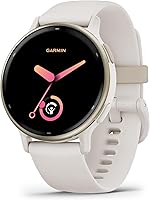
Apple Watch vs Garmin: Which Is Better for Daily Use? (October 2026)
For Apple Watch vs Garmin, choose Apple Watch for iPhone calls and texts, or Garmin for longer battery life. Pick the Forerunner 165 for running plans and the vivoactive 5 for varied fitness.
On this page (8 sections)
- Apple Watch vs Garmin: which is better for daily use?
- How do their battery lives compare?
- Which watch fits your workouts?
- Who should buy each watch, and who should skip it?
- What sleep tracking and everyday features matter most?
- How should you set up your new watch?
- What mistakes should you avoid after buying?
- Final choice: Apple Watch vs Garmin for your day
Apple Watch wins for iPhone communication; Garmin wins for longer battery life and fitness guidance. This Apple Watch vs Garmin comparison covers 3 specific choices: the Apple Watch SE 3 GPS 40mm, Garmin Forerunner 165 and Garmin vivoactive 5 42mm.
Choose the SE 3 if calls and texts matter most, the Forerunner if you want a running plan, or the vivoactive if your exercise week includes several activities. Your charging habits can settle a close decision.
These models show different approaches to daily use, so use this comparison to choose among them rather than assuming every watch from either brand works the same way.
| Product | Best for | Smartwatch battery | Phone compatibility | Main focus | Our score |
|---|---|---|---|---|---|
| Apple Watch SE 3 GPS 40mm | busy iPhone users | Up to 18 hours | iPhone | Communication and everyday activity | 9.1 |
| Garmin Forerunner 165 | goal-focused runners | Up to 11 days | Android and iPhone | Running plans and recovery | 8.9 |
| Garmin vivoactive 5 42mm | mixed workout routines | Up to 11 days; up to 5 days with always-on display | Android and iPhone | Varied fitness and daily activity insights | 8.7 |
Apple Watch vs Garmin: which is better for daily use?
The SE 3 suits an iPhone-centered day, while these Garmin watches suit people who want their watch to focus on activity and recovery. Start with what you'll ask it to do during an ordinary weekday.
Apple's watch lets you send texts, take calls, listen to music and podcasts, and receive notifications through your iPhone or Wi-Fi. That makes it useful when your phone is nearby but inconvenient to reach, such as while cooking or sorting laundry.
The Garmin models show smart notifications from a paired Android or Apple phone. Receiving a notification isn't the same as handling a call or composing a reply, so don't assume those tasks work alike across these watches.
Choose Apple if wrist communication is the reason you're buying a smartwatch. Choose Garmin if seeing an alert is enough and you'd rather put more emphasis on fitness guidance or fewer charging stops.
For a wider view of phone-focused choices, compare our guides to smartwatches for iPhone and smartwatches for everyday use.
How do their battery lives compare?
Garmin gives you more time between charges, while Apple gives you a short top-up option. The practical difference is how much space charging needs in your routine.
Apple estimates 18 hours for the SE 3 and says a 15-minute charge can provide up to 8 hours of battery life. Plan a regular charging break, especially if you want to wear it both during the day and overnight.
Both Garmin models offer up to 11 days in smartwatch mode. The Forerunner 165 offers up to 19 hours in GPS mode, while the vivoactive 5 drops to up to 5 days with its display always on.
Those figures describe different uses, not a promise that every wearer will get the same result. A long GPS workout and an always-on screen change the battery calculation.
For overnight wear, charge while you're awake and doing something predictable, such as showering or sitting at your desk. Keep the charger where that break happens so you don't have to remember a separate task.
Garmin is the easier choice if you often forget short daily chores or spend several nights away from a charging spot. For more on matching estimates to real routines, see how long a smartwatch battery lasts.
Which watch fits your workouts?
Choose the Forerunner 165 for a running schedule, the vivoactive 5 for a varied exercise week, or the SE 3 for activity tracking alongside communication. More workout choices only help if they match activities you actually do.
The Forerunner has 25+ activity profiles, including running, cycling, HIIT and strength. Built-in GPS provides pace and distance, while its training tools help turn recorded workouts into a plan for the next session.
The vivoactive has more than 30 indoor and GPS sports apps, including walking, swimming, cycling and golf. Preloaded cardio, yoga, strength, HIIT and Pilates workouts suit someone whose schedule changes with the weather or available time.
The SE 3 tracks activities such as running and strength training, with real-time metrics and Workout Buddy. It fits someone who wants to record regular exercise without making a running program the center of the buying decision.
Before choosing, write down your last 2 weeks of exercise. Buy for that pattern first, then consider a realistic next goal rather than a sport you might try someday.
For more running-focused options, see the best Garmin watches for running.
Apple Watch vs Garmin for a running plan
The Forerunner 165 offers the clearest running structure here. Its daily suggested workouts adapt to performance and recovery, and race-adaptive plans provide suggestions for specific events.
Training effect explains a workout's main fitness benefit, while recovery time estimates how long to wait before another high-effort session. These tools suit runners who otherwise repeat the same run or make every outing hard.
The vivoactive also offers Garmin Coach plans, so a running goal doesn't automatically require the Forerunner. Choose the more focused model when running guidance will shape your week, rather than serve as an occasional extra.
Who should buy each watch, and who should skip it?
Buy for the feature you'll use most often, then rule out the tradeoff you won't tolerate. Each watch has a clear buyer, and none needs to suit everyone.
Apple Watch SE 3: for frequent iPhone communication
Choose the SE 3 if you regularly want to answer a call or send a text without reaching for your iPhone. Customizable faces and band choices also let you adjust its look for work, exercise and evenings.
Skip it if frequent charging already causes you to leave devices unused. An Android user should focus on the Garmin models here, which explicitly support Android pairing, rather than buy this iPhone-connected option.
Garmin Forerunner 165: for runners with a goal
Choose the Forerunner if you're preparing for an event or want direction beyond recording miles. Its AMOLED touchscreen and traditional buttons give you both touch and button controls.
Skip it if training suggestions and recovery details will become screens you never open. Someone who mainly wants walks, sleep insights and varied gym sessions has a clearer reason to consider the vivoactive.
Garmin vivoactive 5: for varied activity and overnight wear
Choose the vivoactive if you move between several sports and want sleep coaching alongside exercise records. Its music storage supports playlists from Spotify, Amazon Music or Deezer accounts and listening through wireless headphones without your phone.
Its wheelchair mode tracks pushes rather than steps and includes push and handcycle activities. That is a specific reason to choose it, not just another feature to count.
Skip it if your main goal is handling iPhone calls and texts from your wrist. For runners who want event-focused guidance, compare the Forerunner's training tools before choosing by appearance alone.
What sleep tracking and everyday features matter most?
Choose sleep summaries you'll review and everyday features that fit your routine. A long feature list is less useful than a few clear habits, such as checking your overnight records or keeping emergency contacts current.
The SE 3 includes sleep tracking and a sleep score for reviewing your overnight routine alongside daily activity. Its hard-fall and severe-car-crash detection can help connect you with emergency services and notify emergency contacts.
The Forerunner provides a morning report with sleep, recovery and training outlook information in one place. Its incident detection applies during select outdoor activities, while Assistance can send your live location to emergency contacts.
Those Garmin safety messages require setup, a paired compatible smartphone and network coverage with data connectivity. A recorded GPS route alone doesn't mean a watch can send an emergency message.
The vivoactive adds Body Battery energy estimates alongside records of sleep, naps and workouts. Sleep coaching and automatic nap detection suit someone who wants to review patterns across the whole day.
Its morning report brings overnight information and daily activity details into a convenient summary. Choose the screens you find useful, whether that means checking sleep duration, reviewing yesterday's workout or finding your next planned activity.
Consistent overnight wear makes sleep records easier to compare across your week. Balance that convenience with a comfortable band and a charging break that fits your day.
How should you set up your new watch?
Set up the phone connection, fit and essential alerts before adding extras. A simple first-day setup makes it easier to learn what the watch contributes to your routine.
Check the phone connection and notification settings
Pair the watch with your compatible phone and review the permissions needed for the features you plan to use. For Garmin, the Garmin Connect app brings together activity, sleep and fitness information.
Start with calls, messages and only the apps that need a prompt response. Sending every shopping alert and group chat to your wrist can make useful notifications harder to notice.
The SE 3 here is the GPS model, so plan around its iPhone or Wi-Fi connection. If you expect to leave your phone behind and remain connected, read Apple Watch GPS vs Cellular before choosing a version.
Garmin users can check our guide to how Garmin works with an iPhone for a closer look at that pairing.
Set fit and activity preferences
Wear the watch snugly enough to stay in place without pinching your skin. If it slides around during exercise or leaves uncomfortable marks, adjust the band rather than accepting a poor fit.
Case size alone doesn't tell you how a watch will feel on your wrist. Our guide to choosing an Apple Watch size explains the fit questions worth considering.
Put your usual workouts where they're easy to find and check your personal settings before starting a plan. Begin with a manageable goal, then adjust it once you know how the watch fits into your week.
Finish safety and music setup
Add current emergency contacts and review the connection requirements for any safety feature you enable. Let those contacts know they may receive an alert, and revisit the settings when contact details change.
If you choose the vivoactive for music, prepare your playlists and pair your headphones before leaving home. Check the terms of the music account you plan to use so the feature works as expected.
What mistakes should you avoid after buying?
Avoid chasing every metric or treating the longest battery estimate as your personal result. A watch becomes more useful when you keep its settings and your expectations focused.
Don't let a score dictate your schedule
Sleep, energy and recovery estimates can help reveal patterns, but they don't need to decide every workout. Use them alongside your available time, planned activities and training goals when organizing your week.
One poor sleep score doesn't require you to rearrange a normal day. Compare several days of records with your bedtime, wake-up time and activity schedule.
Don't assume every phone-free feature works alike
Recording an activity, playing stored music and sending a message are separate jobs. Confirm which job you need before deciding whether leaving your phone at home is practical.
This is especially useful when comparing Garmin's phone-free music option with the SE 3 GPS model's connected features. A feature that works without a phone doesn't make every other function independent of one.
Don't neglect the band and charging contacts
Follow the brand's cleaning guidance and dry the watch and band after sweat or moisture. Keep charging contacts clean and dry, and avoid harsh cleaners unless the care instructions allow them.
Adjust the band or take the watch off when the fit becomes uncomfortable. Regular wear is useful only if the fit stays comfortable enough for both activity and rest.
Don't keep settings you don't need
Review alerts and display preferences after the first week. Turn off distractions and keep the information that helps you make a decision.
A small set of useful screens is easier to understand than a dashboard full of numbers you never use. For broader shopping priorities, our smartwatch everyday-use guide covers more options.
Final choice: Apple Watch vs Garmin for your day
Choose the SE 3 for communication, the Forerunner 165 for running direction, or the vivoactive 5 for varied fitness and sleep insights. Settle your Apple Watch vs Garmin decision by naming the task you want help with most often.
If you're still split, use charging as the tie-breaker. Pick the watch whose care routine you can maintain, then set up the few features that earned it a place on your wrist.
Ready to narrow the model choice? Compare the best Apple Watches for an iPhone-focused routine, or the best Garmin watches for more fitness-focused options.


Frequently asked questions
Is Apple Watch or Garmin better for everyday use?
Apple Watch is the better fit for iPhone calls and texts, while Garmin suits people who prioritize longer battery life and fitness guidance. Choose by the task you want your watch to handle most often: communication during a busy day, structured running, or a broad mix of daily activities.
Can you use a Garmin watch with an iPhone?
Yes, the Forerunner 165 and vivoactive 5 support iPhone pairing and can show smart notifications from a compatible paired phone. You don't need to choose Apple Watch just because you use an iPhone.
Read our guide to using a Garmin watch with an iPhone before deciding which connection features matter.
Which lasts longer between charges, Apple Watch or Garmin?
Garmin has the longer stated battery life here: both models offer up to 11 days in smartwatch mode, compared with 18 hours for the SE 3. Usage changes that gap, so compare the mode you need, including GPS recording or an always-on display, rather than relying only on the longest estimate.
Which is better for running, Apple Watch or Garmin?
The Forerunner 165 is the stronger choice for a structured running plan because it combines adaptive workout suggestions, race plans, training effect and recovery time. The SE 3 suits runners who mainly want workout metrics alongside iPhone communication, while the vivoactive 5 fits running within a more varied exercise routine.
Do Garmin watches need a monthly fee?
The vivoactive 5 includes free Garmin Coach adaptive training plans, but that doesn't mean every connected service has the same terms. Check any music account or optional service you intend to use before subscribing.
Our guide to Garmin watch fees explains what to check when planning ongoing costs.