7 Best Smartwatches for iPhone (October 2026)
The best smartwatches for iPhone include the Apple Watch SE 3 GPS 40mm for everyday iPhone use, the Garmin Forerunner 165 for race preparation, and the Apple Watch SE 3 GPS 44mm for larger wrists.
On this page (8 sections)
- Which smartwatch for iPhone fits your routine?
- How we chose these iPhone smartwatch picks
- How the top iPhone smartwatches compare
- How do you choose the best smartwatch for iPhone?
- What should you set up before relying on your watch?
- How do you keep an iPhone smartwatch useful and comfortable?
- Which buying mistakes should iPhone users avoid?
- Which smartwatch for iPhone should you choose?
The Apple Watch SE 3 GPS 40mm is the best smartwatch for iPhone for most people because it covers everyday communication, workouts and sleep tracking in a smaller case. Choose Garmin when running guidance or fewer charging stops matters more.
Start with the job you want your watch to do. Reading messages during work, following a running plan and staying reachable without a phone lead to different choices.
Our guide to smartwatches for everyday use explains the wider category. For a narrower comparison, see our best Apple Watches or read how Garmin works with iPhone.
Our picks at a glance
-
1

-
2

-
3

- 4
 Best for varied workout routinesCheck it
 - 5
 Check it
Apple Watch Series 12 GPS 42mm
Best for daily activity planning - 6
 Check it
Apple Watch Series 11 GPS 42mm
Best for sleep tracking and arrival updates - 7
 Check it
Apple Watch SE 3 GPS + Cellular 40mm
Best for phone-free errands
Which smartwatch for iPhone fits your routine?
The SE 3 GPS 40mm fits everyday iPhone use, while the Forerunner 165 fits runners who want a plan. Choose the remaining models for a specific need, such as case fit, mixed workouts, sleep tracking or cellular calls.
Read each recommendation with your normal week in mind. A feature deserves weight when you'll use it often or when it solves a clear problem that your phone cannot solve from your pocket.
Apple Watch SE 3 GPS 40mm: Best for everyday iPhone use
- Works with iPhone or Wi-Fi
- 18-hour battery life
- Sleep and workout tracking
- Fall and severe car crash detection
Choose this smaller SE 3 for everyday communication, activity tracking and sleep insights. It suits people who usually keep their iPhone nearby and can make room for a daily charging routine.
Pros
- Calls, texts and Siri
- Workout and sleep tracking
- Fast charging
Cons
- Needs a regular charging routine
- No cellular connection
The Apple Watch SE 3 GPS 40mm suits people who want to handle small tasks without reaching for their iPhone. Through an iPhone or Wi-Fi connection, it supports calls, texts, notifications, Siri, music and podcasts.
Its workout tools cover activities such as running and strength training. Sleep tracking and sleep scoring give you another way to review your overnight routine alongside your daily activities.
Apple includes hard fall and severe car crash detection to help connect you with emergency services. These features add a reason to wear the watch consistently, but they do not replace an emergency plan.
Apple rates battery life at up to 18 hours, with a 15-minute charge adding up to 8 hours. A planned charging break matters if you want both daytime wear and overnight tracking.
Buy this version if the smaller case fits and your phone usually travels with you. Skip it if independent calls are essential, or if keeping track of another daily charging task would make you stop wearing it.
Garmin Forerunner 165: Best for race preparation
- Built-in GPS
- Up to 11 days in smartwatch mode
- 25+ activity profiles
- Garmin Coach plans
Choose the Forerunner for suggested runs, event-focused plans and recovery guidance. Its touchscreen and physical buttons give runners a choice of controls.
Pros
- Adaptive running guidance
- GPS pace and distance
- Training effect and recovery time
Cons
- GPS use shortens battery life
- Safety messages require setup, a paired compatible phone and network data coverage
The Garmin Forerunner 165 suits runners who need help deciding what to do next. Daily suggested workouts adapt to performance and recovery, while Garmin Coach and race adaptive plans support training toward an event.
Built-in GPS records pace and distance for reviewing your runs. Its AMOLED touchscreen works alongside traditional buttons, giving you a control option beyond tapping or swiping.
The useful distinction is what happens between runs. Training effect explains a workout's main benefit, recovery time guides spacing between hard sessions, and the morning report brings sleep and training outlook together.
Garmin rates it for up to 11 days in smartwatch mode or 19 hours in GPS mode. Longer runs draw from the second figure, so a busy training week changes your charging schedule.
Buy it for structured running, with iPhone notifications as a supporting feature. Skip it if calls and message handling are your main reason for buying a smartwatch.
For other training-focused choices, read our Garmin watch guide.
Apple Watch SE 3 GPS 44mm: Best for larger wrists
- Works with iPhone or Wi-Fi
- 18-hour battery life
- Sleep and workout tracking
- Customizable faces
Choose this SE 3 if the smaller version feels undersized on your wrist. The larger case keeps the same core communication, sleep and workout features.
Pros
- Larger case option
- Same core features as smaller SE 3
- Customizable faces and bands
Cons
- Larger case may crowd smaller wrists
- No cellular connection
The Apple Watch SE 3 GPS 44mm suits buyers who prefer how a larger case sits on their wrist. Its main role here is to offer another fit within the SE 3 family.
You get the same core communication, sleep, workout and safety features as the smaller GPS version. Choose between them by comfort and proportion rather than expecting the larger model to add a different set of tools.
Think beyond how the watch looks with your arm resting on a table. Bend your wrist, picture a snug jacket cuff and consider whether you'll be comfortable wearing it in bed.
A case that feels too large can catch on clothing or press against your hand. A loose band is not a good solution because the watch should stay in place during normal movement.
Choose this version if the smaller SE feels undersized and the larger case stays comfortable. Skip it if you are sizing up solely for more features.
Our guide to choosing an Apple Watch size explains the fit decision.
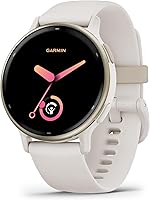
Garmin vivoactive 5 42mm: Best for varied workout routines
- Up to 11 days in smartwatch mode
- More than 30 sports apps
- Sleep coaching and nap detection
- Music storage
Choose the vivoactive for mixed activities, sleep coaching and stored music. It also includes wheelchair activities and push tracking for buyers whose routines need those options.
Pros
- Broad indoor and outdoor activity choices
- Sleep coaching and nap detection
- Phone-free listening with wireless headphones
Cons
- Always-on display shortens battery life
- Custom workouts are created in Garmin Connect
The Garmin vivoactive 5 42mm suits people whose exercise week changes from day to day. More than 30 indoor and GPS sports apps cover activities including walking, cycling, swimming, golf and strength work.
Its sleep tools help you review your overnight routine. Sleep coaching and automatic nap detection bring nighttime sleep and daytime rest into the same app, alongside your activity records.
Wheelchair mode tracks pushes rather than steps and includes push and handcycle activities. That makes it worth considering when step-based goals do not reflect how you move.
Music storage is another reason to choose it. You can download music from supported Spotify, Amazon Music or Deezer accounts and listen through wireless headphones without carrying your phone.
Garmin rates battery life at up to 11 days, or 5 days with the display always on. That setting is a meaningful trade-off, rather than a free extra.
Buy it for varied activity, sleep tracking and stored music. Skip it if event-focused running guidance or Apple-style wrist communication is your main goal.
Apple Watch Series 12 GPS 42mm: Best for daily activity planning
- Works with iPhone or Wi-Fi
- Up to 24 hours of normal use
- Workout pacing tools
- Daily sleep score
Choose Series 12 when workout pacing and daily sleep tracking are specific priorities. Its activity and sleep summaries give you information to review alongside your usual schedule.
Pros
- Workout pacing tools
- Daily sleep score
- Fast charging
Cons
- Workout Buddy requires a nearby iPhone
- No cellular connection on this version
The Apple Watch Series 12 GPS 42mm suits buyers who want workout and sleep summaries within an Apple Watch. Those records let you review recent activity and overnight wear alongside your plans for the day ahead.
It also includes a daily sleep score for reviewing your overnight routine. These summaries make more sense for someone who will regularly open the app than someone who only wants an occasional step count.
For workouts, Pacer provides a way to follow a planned running pace. Workout Buddy uses Apple Intelligence from a nearby iPhone, so that feature should not be the reason you leave the phone home.
Apple rates normal-use battery life at up to 24 hours, with a 15-minute fast charge adding up to 12 hours. Plan a charging window even when a watch can cover most of a full day.
Choose Series 12 if workout pacing and sleep tracking have a clear place in your routine. Skip it if you cannot name an added feature you'll use beyond what the SE 3 already covers.
Apple Watch Series 11 GPS 42mm: Best for sleep tracking and arrival updates
- Workout tracking
- Sleep score
- Up to 24 hours of normal use
- Water resistant up to 50m
Choose Series 11 for sleep scoring, workout tracking and everyday iPhone tasks. It also includes Check In for arrival notifications and fast charging to fit around daily wear.
Pros
- Workout and sleep tracking
- Fast charging
- Check In arrival notifications
Cons
- Overnight tracking needs a planned charging window
- No cellular connection on this version
The Apple Watch Series 11 GPS 42mm suits buyers who want sleep scoring and everyday iPhone features. It combines workout tracking with calls, messages and reminders when connected through an iPhone or Wi-Fi.
Its daily sleep score offers a quick way to review overnight records. Consider whether you will regularly check those summaries and make room for charging before wearing the watch to bed.
Check In serves a different daily need by notifying a loved one when you arrive at your destination. Consider whether that arrival message would be useful during regular trips or evening walks.
Apple rates normal-use battery life at up to 24 hours, with up to 8 hours added by a 15-minute fast charge. It also specifies 50m water resistance and IP6X dust resistance.
Choose Series 11 because its sleep tracking, charging and arrival updates fit your routine, rather than because its name sounds like the next step above an SE. Skip it if calls, reminders and basic activity tracking cover your needs.
Apple Watch SE 3 GPS + Cellular 40mm: Best for phone-free errands
- Calls without your iPhone nearby
- Stream music and podcasts
- 18-hour battery life
- Apple Watch For Your Kids
Choose the cellular SE 3 for calls and streamed audio when your iPhone stays home. Confirm carrier support, coverage and service requirements before choosing it for that role.
Pros
- Calls away from your iPhone
- Music and podcast streaming
- Family setup option for children
Cons
- Cellular use depends on service support and coverage
- Needs a regular charging routine
The Apple Watch SE 3 GPS + Cellular 40mm suits people who regularly leave their phone behind but still want calls. It also supports music and podcast streaming away from the iPhone, including listening through AirPods.
Picture the trips where you would use it: a short walk, an errand or a workout without a phone pocket. If those trips rarely happen, the GPS version is the more direct fit.
The core SE 3 sleep and workout features remain part of the package. Cellular changes how you connect, rather than turning this into a different type of fitness watch.
Apple Watch For Your Kids is another possible use. It allows setup for a child without their own iPhone, with calling, texting and location sharing, subject to the setup and service requirements.
Choose it after confirming carrier support, coverage and activation needs. Skip it if you expect cellular hardware alone to provide service, or if you normally carry your iPhone everywhere.
How we chose these iPhone smartwatch picks
We put everyday usefulness with an iPhone first, then considered the needs that justify choosing a different model. Communication leads the Apple recommendations; training guidance and longer charging intervals lead the Garmin choices.
The ranking favors broad use over specialized features. A lower-ranked watch can still be the better buy when it solves your main problem, such as phone-free calls or preparing for a race.
Case variants earn a place because fit affects whether you'll keep wearing a watch. Added workout and sleep tools matter when you want to use them, rather than simply collecting more measurements.
Charging requirements also matter when you plan to wear a watch overnight. Consider how sleep tracking fits around daytime use, and whether a regular charging break suits your schedule.
How the top iPhone smartwatches compare
Compare connection, charging and purpose before counting features. Those differences determine whether a watch will help during your normal day or spend more time on its charger than on your wrist.
| Product | Best for | Phone connection | Battery life | Case size | Our score |
|---|---|---|---|---|---|
| Apple Watch SE 3 GPS 40mm | everyday iPhone use | iPhone or Wi-Fi | Up to 18 hours | 40mm | 9.1 |
| Garmin Forerunner 165 | race preparation | Paired iPhone for smart notifications | Up to 11 days in smartwatch mode | 8.9 | |
| Apple Watch SE 3 GPS 44mm | larger wrists | iPhone or Wi-Fi | Up to 18 hours | 44mm | 8.8 |
| Garmin vivoactive 5 42mm | varied workout routines | Paired iPhone for smart notifications | Up to 11 days in smartwatch mode | 8.7 | |
| Apple Watch Series 12 GPS 42mm | daily activity planning | iPhone or Wi-Fi | Up to 24 hours of normal use | 42mm | 8.5 |
| Apple Watch Series 11 GPS 42mm | sleep tracking and arrival updates | iPhone or Wi-Fi | Up to 24 hours of normal use | 42mm | 8.3 |
| Apple Watch SE 3 GPS + Cellular 40mm | phone-free errands | GPS + Cellular | Up to 18 hours | 40mm | 8.2 |
Start by crossing out models that fail a must-have requirement. A running plan cannot substitute for independent calls, and cellular connectivity cannot substitute for the training guidance you actually want.
Then compare the remaining watches on comfort and the tasks you expect to repeat. This keeps a long feature list from outweighing a simple daily need.
How do you choose the best smartwatch for iPhone?
Choose around your main task, your charging habits and your wrist fit, in that order. Sleep tracking and appearance can break a tie after those basics work for you.
Which smartwatch for iPhone suits calls or training?
Apple Watch is the starting point for calls, texts and Siri; Garmin deserves a closer look when fitness guidance comes first. Decide which role would still make the watch useful after the novelty wears off.
For a commuter, reading a message and taking a quick call may be enough. For a runner, knowing the next workout and when to ease back may matter more.
Receiving smart notifications does not mean every watch handles conversations in the same way. Choose based on what you need to do after reading the alert, including whether you are happy to reach for your phone.
Read Apple Watch vs Garmin for daily use for that broader choice. Our Galaxy Watch and iPhone guide covers another pairing you may be considering.
How should you compare battery claims?
Use battery figures as planning limits, then consider which mode matches your day. A smartwatch-mode estimate does not describe continuous GPS workouts, and a fast-charge figure does not mean a full recharge.
Think through your longest normal stretch away from a charger. Include work, exercise, an evening out and overnight wear if you want sleep tracking.
If you already charge devices at a desk each morning, daily watch charging may fit easily. If your schedule changes often, longer intervals may matter more than another workout metric.
A short charging window only helps if you remember to use it. Choose a repeatable moment, rather than assuming you'll find spare time before the battery runs low.
Do you need GPS or cellular?
Choose cellular for communication away from your phone, rather than for location tracking alone. GPS and a mobile connection solve different problems.
A GPS watch can record location-based workout information without that meaning it can place an independent call. Also separate downloaded music from streaming, since stored audio and live online access have different needs.
For cellular, confirm carrier compatibility, ongoing service requirements and coverage where you exercise or travel. For a clearer decision, read Apple Watch GPS vs Cellular.
How do you choose a comfortable size?
Choose the case and band as one fit decision. The watch should sit securely without pinching, sliding around or pressing into your hand when you bend your wrist.
Case measurements do not tell you the whole fit. Band adjustment, wrist shape and where you wear the watch also matter, especially during exercise and sleep.
Use our Apple Watch size guide to narrow the choice. If features are still the deciding factor, compare Apple Watch SE 3 vs Series 11.
What should you set up before relying on your watch?
Set up pairing, notifications, fit and safety contacts before treating your watch as part of your daily routine. A watch needs the right permissions and settings to do the job you bought it for.
Pair it and allow only useful alerts
Follow the watch's guided pairing process and use the companion app it requires. Keep the phone and watch close while setup finishes, then confirm that activity information syncs.
Start with calls, messages, calendar reminders and any essential work alerts. Allowing every app to buzz can turn a useful glance into another stream of interruptions.
Send yourself an ordinary message and check how it appears. Make sure the text is readable and that you understand which actions are available from the watch.
Configure safety features deliberately
Add emergency contacts and complete any safety setup the watch offers. Explain to those contacts what a watch-generated message could mean and how you would want them to respond.
The Forerunner's incident detection applies to select outdoor activities. Its Assistance and safety messages require setup, a paired compatible smartphone and network data coverage.
Keep those dependencies in mind when planning a route. A feature that needs a phone connection should not be your only way to seek help in an area without coverage.
Start with one useful activity goal
Choose a goal you can act on, such as recording walks or following a running plan. You do not need to turn every available metric into a target.
Give yourself time to build a consistent routine before comparing trends. Changing settings, wear habits and workout types every day makes the information harder to interpret.
How do you keep an iPhone smartwatch useful and comfortable?
Keep the watch clean, secure and charged, and review trends rather than reacting to every score. Consistent wear habits usually make the information easier to use.
Clean the watch and protect the charging connection
Follow the manufacturer's cleaning instructions for both the watch and its band. After exercise, remove sweat and dirt as directed, and dry the watch before charging.
Keep charging contacts free of residue and check that the watch actually begins charging. A charger placed nearby is not the same as a connection that has seated correctly.
Water resistance does not make every cleaning method suitable. Check care instructions before using soap, chemicals, heat or a cleaning tool.
Adjust fit for exercise and sleep
Keep the band secure enough that the watch stays in position without digging into your skin. If it slides around during a workout, check the adjustment rather than repeatedly moving it back.
For sleep tracking, comfort matters because you need to leave the watch on. Revisit the fit if pressure, trapped moisture or a bulky case makes overnight wear unpleasant.
Use scores as prompts for reflection
Compare a low recovery or sleep score with your schedule and what happened the day before. A late night, unusual workout or change in wear habits can help explain a shift.
Look at several days of records before drawing conclusions about your routine. One score is less useful for planning than a consistent record of your sleep schedule and workouts.
Which buying mistakes should iPhone users avoid?
Avoid choosing by model name, maximum battery life or feature count alone. The most costly mismatch is a watch that cannot handle the task you expected from it.
Assuming every compatible watch works like Apple Watch
iPhone compatibility means a watch can work with the phone, but the available communication functions still matter. Read notifications, replies, calls and independent connectivity as separate requirements.
Choose the Forerunner for its running role or the vivoactive for its broader activity tools. Do not buy either on the assumption that notifications promise the same communication experience as the Apple options.
Paying attention to features you'll never use
Name 2 or 3 tasks before comparing models. If your list is messages, walks and reminders, added workout metrics should not decide the purchase by themselves.
The same rule works in reverse. If a race plan is the reason you want a watch, prioritize guidance you can follow over a longer collection of unrelated features.
Forgetting the phone and service requirements
Check support for your exact iPhone and software version before ordering. For cellular use, confirm that the carrier and plan support the setup you want.
Do not mistake a connection problem for a need to replace the watch immediately. Our guide to why smartwatches keep disconnecting can help you work through that issue.
Which smartwatch for iPhone should you choose?
Choose the best smartwatch for iPhone by matching one watch to your main need. Use this final check to turn the comparison into a decision:
- Everyday calls, messages and activity: choose the SE 3 GPS 40mm.
- A larger fit with the same core features: choose the SE 3 GPS 44mm.
- A running plan and recovery guidance: choose the Forerunner 165.
- Mixed workouts, sleep coaching and stored music: choose the vivoactive 5.
- Workout pacing and daily sleep summaries: choose Series 12.
- Sleep scoring and Check In arrival notifications: choose Series 11.
- Calls while your iPhone stays home: choose the cellular SE 3 after confirming service support.
Before ordering, settle the case size, charging window and connection you need. Those choices will shape daily satisfaction more than an extra metric you rarely open.
For more options by use, visit our everyday smartwatch picks. If your final choice is between wrist communication and fitness guidance, compare Apple Watch and Garmin.
Our top 3 picks at a glance
-
1
-
2
-
3
Frequently asked questions
Which smartwatch works best with an iPhone?
The Apple Watch SE 3 GPS 40mm is the best fit for most everyday iPhone users because it covers calls, texts, Siri, workouts and sleep tracking. Choose a Garmin instead when structured running guidance or fewer charging stops matters more than handling communication from your wrist.
Can you use a Garmin watch with an iPhone?
Yes, the Garmin Forerunner 165 and vivoactive 5 pair with an iPhone for smart notifications. Choose the Forerunner for running plans and recovery guidance, or the vivoactive for varied activities and stored music.
Receiving a notification is different from making calls or replying, so choose around the functions you need.
Can a smartwatch make calls without an iPhone?
The Apple Watch SE 3 GPS + Cellular 40mm supports calls without your iPhone nearby when the required cellular service and coverage are available. Confirm carrier support and activation requirements first.
Built-in GPS records location information; it does not, by itself, provide a mobile connection for calls.
How often will I need to charge an iPhone smartwatch?
Plan around daily charging for these Apple Watches and longer intervals for the Garmins, with actual timing shaped by your settings and activities. GPS workouts and an always-on display can shorten those intervals.
Our smartwatch battery life guide explains how to build a charging routine around your use.