5 Best Fitness Trackers (October 2026)
The best fitness trackers include the Fitbit Charge 6 for daily outdoor workouts, the Fitbit Air for distraction-free routines, and the Fitbit Inspire 3 for everyday activity habits.
On this page (7 sections)
- Which best fitness tracker pick fits your routine?
- How do you choose the best fitness tracker before buying?
- How should you set up a fitness tracker?
- How can you use activity and sleep information well?
- How do you care for a fitness tracker and avoid recording gaps?
- Which common buying mistakes should you avoid?
- Which fitness tracker should you choose for your week?
The best fitness tracker for most people is Fitbit Charge 6, because its built-in GPS supports outdoor workouts alongside daily activity and sleep tracking. Choose Fitbit Air if you want to avoid another screen, or Inspire 3 if you usually carry your phone.
Start with the habit you want to support: regular walks, consistent exercise or a clearer picture of your sleep schedule. The right band makes that habit easier without demanding features you'll rarely use.
If you also want a wider choice of wrist functions, read our smartwatch guide and smartwatch versus fitness tracker comparison.
Our picks at a glance
-
1

-
2

-
3

Which best fitness tracker pick fits your routine?
Charge 6 is the strongest all-round choice, while the other bands serve clearer preferences around distraction, charging and phone use. Pick by your daily routine before comparing extra features.
We compared phone support, GPS, displays, charging needs and activity tools. A higher score reflects a broader fit for this guide, but a specific limitation can make a lower-scoring band the better choice for you.
| Product | Best for | GPS | Phone support | Battery | Our score |
|---|---|---|---|---|---|
| Fitbit Charge 6 | daily outdoor workouts | Built-in | Android and iOS | 7-day average | 7.2 |
| Fitbit Air | distraction-free routines | Via smartphone | Android 11.0+ and iOS 16.4+ | 5-day average; up to 1 week claimed | 7.1 |
| Fitbit Inspire 3 | everyday activity habits | Via smartphone | Android and iOS | Up to 10 days | 7.0 |
| Samsung Galaxy Fit 3 | Android gym routines | No GPS | Android only | 13-day average; up to 14 days claimed | 6.8 |
| Xiaomi Smart Band 10 | infrequent charging | No GPS | Android and iOS | Up to 21 days claimed | 6.7 |
Fitbit Charge 6: Best for daily outdoor workouts
- Built-in GPS
- 40+ exercise modes
- All-day activity tracking
- Sleep Score
Choose Charge 6 for outdoor routes and varied workouts without relying on smartphone GPS. Google Maps directions and Google Wallet add useful extras.
Pros
- Built-in GPS for outdoor exercise
- 40+ exercise modes for varied routines
- Google Maps directions and Google Wallet
Cons
- Premium coaching requires a separate subscription
- Shorter stated battery life than several alternatives here
Fitbit Charge 6 suits people who alternate between outdoor walks, runs and indoor exercise. Its built-in GPS is the main reason to choose it over bands that rely on a phone for route recording.
The 40+ exercise modes cover varied routines, while all-day activity and sleep tools keep the focus broader than workouts alone. Review your daily movement alongside the exercise sessions you choose to record.
Google Maps directions, Google Wallet and YouTube Music controls add convenience around exercise. Check compatibility for those services and your gym equipment before making any one of them the reason you buy.
Fitbit gives Charge 6 a 7-day average battery life. Optional Google Health Premium coaching requires a separate subscription after the included 3-month trial.
Buy it if outdoor route recording is a regular part of your week and you want information on your wrist. Skip it if you mainly want quiet background tracking or place more value on longer charging intervals.
Fitbit Air: Best for distraction-free routines
- No display
- Micro-adjustable fit
- Optical heart rate sensor
- Quick charging
Fitbit Air suits people who want to collect activity information without another screen. Its adjustable band is designed for work, exercise and sleep.
Pros
- No screen to distract you
- Micro-adjustable band fits wrists from 130 to 210 mm
- Google claims up to 1 day of battery life from 5 minutes of charging
Cons
- Cannot show workout information on your wrist
- GPS requires your smartphone
- Premium coaching requires a separate subscription
Fitbit Air suits people who want tracking to stay in the background during work, exercise and sleep. Its screen-free design removes the temptation to keep checking a wrist display.
That choice has a clear cost: you can't glance down for workout information. Plan to review information on your phone, and skip Air if seeing progress during exercise helps you stay on track.
The micro-adjustable band fits wrists from 130 to 210 mm. Measure your wrist before buying, especially if you tend to find bands too loose or too tight.
Air uses smartphone GPS and supports Android 11.0 or higher and iOS 16.4 or higher. Google gives a 5-day average battery figure and an up-to-a-week claim.
Google also claims up to 1 day of battery life from a 5-minute charge. That makes a short top-up useful, but it doesn't mean a full recharge takes only 5 minutes.
Choose Air for low-distraction wear. Optional premium coaching should be a separate decision from choosing the band itself.
Fitbit Inspire 3: Best for everyday activity habits
- Up to 10 days of claimed battery life
- All-day activity tracking
- Sleep score
- Small and large bands included
Inspire 3 suits daily activity and sleep tracking when you already carry a phone on walks. Small and large bands help you find a suitable fit.
Pros
- Fitbit claims up to 10 days of battery life
- Small and large bands included
- Call, text, calendar and app alerts
Cons
- GPS pace and distance require your phone
- Doesn't provide the phone-independent GPS of Charge 6
Fitbit Inspire 3 is a sensible choice for building daily activity and sleep habits when you already take your phone on walks. It uses smartphone GPS for route-related pace and distance.
Its activity tracking and sleep score give you several ways to review a routine. Start with one goal, such as walking more often, before trying to act on every number.
Fitbit claims up to 10 days of battery life, and both small and large classic bands are included. Try the band that stays secure without leaving the strap uncomfortably tight.
Call, text, calendar and app alerts add everyday convenience. Keep only useful alerts enabled so the tracker supports your routine without becoming another source of interruptions.
Buy Inspire 3 if you want a display and phone-connected outdoor tracking with fewer charging breaks than Charge 6's stated average suggests. Skip it if leaving your phone behind for GPS-recorded walks or runs is a firm requirement.
Samsung Galaxy Fit 3: Best for Android gym routines

- 1.6 in AMOLED display
- 100+ exercise modes
- Automatic detection for common workouts
- Android devices only
Galaxy Fit 3 suits Android users who want a readable workout screen without needing GPS routes. This international model has no US warranty.
Pros
- 1.6 in AMOLED display
- 100+ exercise modes
- 5ATM and IP68 water resistance
Cons
- Not compatible with iPhone or iOS
- No GPS or Samsung Pay
- International model has no US warranty
- Bundled fast charger is not Samsung-branded
Samsung Galaxy Fit 3 suits Android users whose exercise doesn't depend on GPS routes. Its 1.6 in AMOLED display gives it a clear role for people who want workout information on their wrist.
There are 100+ exercise modes, plus automatic detection for common workouts. The band also includes sleep tracking and tools for reviewing your bedtime routine.
Don't buy it just because its mode count is larger than another band's. A mode for your usual exercise matters more than a long menu of activities you never do.
Samsung gives a 13-day average battery figure and an up-to-14-day claim. The band has 5ATM and IP68 water resistance.
The buying limits are significant: this international model has no US warranty, doesn't support iPhone and has no GPS or Samsung Pay. The bundled fast charger is a generic accessory, not Samsung-branded.
Choose it for an Android gym routine if those limits fit. Skip it if US warranty coverage, iPhone support or GPS route recording is essential.
Xiaomi Smart Band 10: Best for infrequent charging
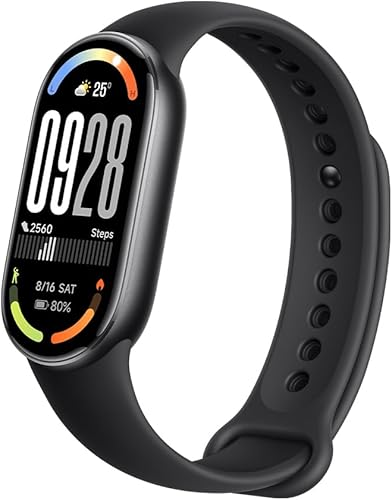
- 1.72 in AMOLED display
- Up to 21 days of claimed battery life
- Android and iOS support
- Sleep tracking
Smart Band 10 suits people who prioritize a large display and fewer charging breaks. Its main app uses metric units, which adds friction for imperial-unit users.
Pros
- 1.72 in AMOLED display
- Xiaomi claims up to 21 days of battery life
- Compatible with Android and iOS
Cons
- No GPS
- Xiaomi Fit app supports metric measurements only
Xiaomi Smart Band 10 suits people who want a larger display and fewer planned charging stops. Its 1.72 in AMOLED screen is the larger of the 2 specified AMOLED screen sizes in this guide.
Xiaomi claims up to 21 days of battery life and a full recharge in about an hour. Use the longer figure as a maximum claim, then build your charging schedule around your actual use.
The band supports Android and iOS, offers activity and sleep tracking, and has no GPS. It suits everyday activity tracking better than a buying decision centered on mapped outdoor routes.
The main app uses metric units. Xiaomi describes a connection to Google Fit for viewing imperial measurements, so expect an extra app step if you prefer pounds, inches or feet.
Choose Smart Band 10 if metric measurements suit you and charging less often is your priority. Skip it if you want imperial units directly in the main app or need GPS as part of your exercise routine.
How do you choose the best fitness tracker before buying?
Choose phone compatibility, GPS needs and screen preference first. Those decisions rule out unsuitable bands more quickly than comparing exercise-mode counts or sleep scores.
Start with one job for your best fitness tracker
Name the main change you want the band to support. “Walk during lunch 4 days a week” gives you a more useful buying goal than “track everything.”
For a daily walking habit, comfortable wear and easy charging may matter most. For outdoor runs, route recording and access to workout information become more important.
Sleep-focused buyers should think about overnight comfort and when they'll charge. A tracker left on a charger every night can't help you build a consistent sleep record.
Check your phone before comparing features
Confirm that your phone can run the required companion app and meets its operating-system requirements. General Android or iOS support doesn't mean every older phone will work.
Galaxy Fit 3 is the clear exclusion for iPhone users. Android owners who want more wrist functions can compare the options in our best smartwatches for Android phones guide.
Also think about your next phone. If you expect to switch between Android and iPhone, support for both systems gives you more flexibility, though moving your history may need separate attention.
Decide what GPS must do
Choose built-in GPS if you want to record outdoor routes without borrowing your phone's GPS. Choose phone-connected GPS if carrying your phone is already part of every walk or run.
GPS independence applies to location tracking, not automatically to directions, music or other connected services. Decide which functions you need away from your phone rather than assuming they all work the same way.
Air and Inspire 3 use smartphone GPS; the Samsung and Xiaomi picks here have no GPS. Don't assume every fitness band gains route recording just because it pairs with a phone.
If running is becoming your main sport, compare these bands with our best Garmin watches for running. That helps you decide whether your next device should focus more closely on running.
Choose a screen you actually want to use
A display helps when you want a quick look at workout information without taking out your phone. A screen-free band suits people who prefer reviewing their day later.
Think about how you'll read the screen while moving. Text size, the amount of information shown and touch controls matter alongside the display's diagonal measurement.
A larger screen isn't automatically easier for every buyer. If possible, compare how much space a band takes on your wrist and whether it catches on cuffs or feels awkward during sleep.
Separate battery averages from maximum claims
Treat an average figure as a different measure from an “up to” claim. Neither gives you a guaranteed charging calendar.
Screen use, workout recording and enabled features can change battery demand. Choose a charging window you can keep even when your use is heavier than usual.
Air and Galaxy Fit 3 each have both an average and a higher maximum figure. Use the more conservative number when planning a trip or a busy week.
Our guide to how long a smartwatch battery lasts explains the habits that affect wearable battery life.
Count the app effort as part of the purchase
Choose a tracker whose app routine you're willing to maintain. If checking progress means working through several screens or moving information between apps, you may stop doing it.
Xiaomi's imperial-unit workaround is a good example of a detail that matters more in daily use than on a feature checklist. Decide whether that extra step suits you before buying.
Treat optional coaching as a separate expense. For Charge 6 and Air, decide whether you want the premium membership before a trial ends, and review its renewal terms when setting it up.
How should you set up a fitness tracker?
Set up the app, fit and permissions before your first workout. A few deliberate choices make the information more useful and reduce avoidable recording gaps.
Pair through the companion app
Charge the band, install its companion app and follow the app's pairing steps. Pairing only through your phone's Bluetooth menu may leave part of the setup unfinished.
Allow time for any offered software updates before heading out. Enter your personal details carefully because activity and calorie estimates can depend on those settings.
Review privacy controls while you're there. Decide which information you want stored or shared, and enable only the permissions needed for features you plan to use.
Make the fit secure without overtightening
Follow the brand's placement guidance and adjust the strap for a secure fit. The band should stay in place during movement without pinching or causing discomfort.
Check the fit during both work and exercise. A strap that feels fine at a desk may shift when your arm gets sweaty or your sleeve presses against it.
Try a different adjustment before abandoning overnight wear. Check the brand's fit guidance and consider another band size if the strap remains uncomfortable.
Prepare GPS and workout controls
For a phone-GPS band, keep the phone with you and review the app's location and background-access settings. Restrictive phone settings can interfere with connected features.
Before an outdoor workout, check that the GPS connection is ready where the device provides that status. Start the activity deliberately when you want a record with a clear beginning and end.
Practice ending and saving a short activity before relying on the band for a longer outing. This also helps you spot an accidental pause or an unfinished session.
Keep the first week simple
Use the first week to learn your normal pattern, rather than chasing every score. Pick one measure you can act on, such as active days or a consistent bedtime.
Review information at a regular time instead of checking it throughout the day. A weekly look often gives you a clearer picture than reacting to each small change.
How can you use activity and sleep information well?
Use tracker information to guide habits and spot trends, while allowing room for imperfect estimates. Consistent wear gives you a better basis for comparison than isolated numbers.
Compare similar days and workouts
Compare walks on similar routes or exercise sessions with similar effort. Terrain, stops and how you wear the band can all affect what a session looks like.
A faster pace on one day doesn't explain the cause by itself. Add context such as route changes, fewer stops or a different workout before deciding what changed.
You don't need to record every movement as a workout. Choose the sessions you want to compare and use daily activity information for the rest.
Treat calorie figures as estimates
Use calorie estimates as rough workout context rather than an exact measure of effort. Small differences between days don't need an immediate change in your routine.
For everyday goals, focus on actions you control: taking a walk, following a workout plan or keeping a regular schedule. Those habits remain useful even when an estimate is imperfect.
Look beyond one sleep score
Use sleep tracking to notice bedtime patterns, missed nights and changes over time. A single low score shouldn't outweigh how you feel or lead you to rewrite your whole routine.
Start with a change you can maintain, such as a steadier wake time. Compare several nights before deciding whether the new habit helps.
A consistent sleep record is more useful than chasing a score. Focus on bedtime and wake-time patterns, and check for recording gaps before comparing different weeks.
How do you care for a fitness tracker and avoid recording gaps?
Keep the band clean, let your skin dry and charge on a routine. Those basic habits help you keep wearing it consistently.
Clean after sweat and dry before charging
Follow the brand's cleaning instructions for the band and sensor area. Avoid harsh cleaners or abrasive scrubbing unless the care guidance specifically allows them.
After exercise, remove trapped sweat and let both the band and your skin dry. Dry the charging contacts before connecting the charger.
Water resistance doesn't mean every exposure is suitable. Follow the exact model's guidance for swimming, hot water, soap and other conditions rather than treating a depth figure as permission for any activity.
Put charging into an existing habit
Choose a regular charging window when you don't need a record, such as while reading or getting ready. If sleep tracking matters, keep bedtime available for wear.
Check the battery before a long outing instead of relying only on the day you last charged. Pack the correct charging cable for travel, even when the advertised battery span covers the trip.
Keep the cable somewhere predictable. A misplaced proprietary cable can create a longer gap than a short battery estimate.
Review sync settings when information is missing
Open the companion app and check the connection before assuming an activity has disappeared. Also review Bluetooth, permissions and any phone settings that restrict background activity.
If problems continue, follow the device's support steps before resetting it. Our guide to why a smartwatch keeps disconnecting covers common phone and wearable connection issues.
Which common buying mistakes should you avoid?
Avoid buying for the longest feature list instead of your actual routine. Compatibility, comfort and the effort of daily use matter more than features you won't use.
Don't confuse more exercise modes with better results
A long mode list is useful only when it includes activities you do and information you understand. Counting modes doesn't tell you how useful the resulting workout record will be.
Make a short list of your regular activities first. Then check the controls and information you need for those sessions.
Don't expect automatic detection to catch everything
Automatic workout detection is convenient, but starting a session yourself gives it a clear beginning. Use that approach when you care about comparing complete workouts.
Check the saved record afterward, especially while learning the device. A missing session or accidental pause is easier to notice before it becomes a repeated habit.
Don't let a minor extra outweigh a dealbreaker
A larger screen doesn't solve unsupported phone compatibility. A long battery claim doesn't replace GPS if mapped routes are the main reason you're buying.
For Galaxy Fit 3, warranty coverage is part of that decision. Decide whether the international model's lack of US warranty is acceptable before considering its other features.
Don't chase every number
Choose a few measures that support a useful action. More information can become noise if you keep changing goals in response to daily fluctuations.
The same applies to alerts. Keep reminders that prompt something worthwhile and turn off interruptions that make you want to stop wearing the band.
Which fitness tracker should you choose for your week?
Choose Fitbit Charge 6 as the best fitness tracker for a mixed routine that includes GPS-recorded outdoor exercise. Its main advantage is recording routes without depending on smartphone GPS.
Pick Fitbit Air if removing the wrist screen is the point of the purchase. Choose Fitbit Inspire 3 if you want a display, carry your phone on walks and prefer a longer claimed charging interval.
Choose Samsung Galaxy Fit 3 for an Android gym routine only if its GPS and US warranty limits are acceptable. Pick Xiaomi Smart Band 10 when charging less often matters most and metric app measurements suit you.
Before ordering, name your dealbreaker and check it once: phone support, GPS, screen access, units or warranty. If you still want more wrist functions, use our smartwatch versus fitness tracker guide to make the final choice.
Our top 3 picks at a glance
-
1
-
2
-
3
Frequently asked questions
What is the best fitness tracker for most people?
Fitbit Charge 6 is the best fit for most people who want outdoor route tracking alongside daily activity and sleep tools. Its built-in GPS gives it the clearest advantage here.
Choose a different band if avoiding a screen or reducing charging breaks matters more than recording routes without smartphone GPS.
Do fitness trackers need a phone?
These trackers use a smartphone for connected features, and some also depend on it for GPS. Fitbit Charge 6 has built-in GPS, while Fitbit Air and Inspire 3 use smartphone GPS.
Our guide to whether smartwatches need a phone explains why GPS independence doesn't make every other feature independent.
Can a fitness tracker replace a smartwatch?
A fitness tracker can cover your needs if activity, workouts and sleep are your main priorities. Decide which wrist features you actually use before choosing: Fitbit Air has no display, while Charge 6 adds Google Maps directions and Google Wallet.
Our smartwatch guide helps compare the broader options.
Which fitness tracker works with an iPhone?
Fitbit Charge 6, Fitbit Air, Fitbit Inspire 3 and Xiaomi Smart Band 10 support iOS, subject to each device's requirements. Samsung Galaxy Fit 3 is Android only.
Check your phone's operating system before ordering, and see our best smartwatches for iPhone guide if you also want to compare watches.
How should I compare fitness tracker battery life?
Compare average figures separately from maximum claims, then consider your own charging routine. Frequent screen use and workout recording can affect time between charges.
A longer estimate helps only if you keep wearing the tracker, so also consider comfort, charging speed and a regular time to top it up.
What matters when choosing a fitness tracker for sleep tracking?
Overnight comfort and a convenient charging schedule matter most for keeping a consistent sleep record. Choose a band you can comfortably wear to bed and recharge during the day.
Review several nights together to compare bedtimes and wake times, rather than focusing on a single sleep score.