Smartwatch vs Fitness Tracker: Which Do You Need? (October 2026)
In the smartwatch vs fitness tracker choice, choose a smartwatch for wrist tools alongside fitness tracking or a tracker for a more focused routine. Start with your screen preference, workout needs and phone compatibility.
On this page (10 sections)
- Smartwatch vs fitness tracker: what’s the main difference?
- Which one is better for daily use?
- Which device is better for exercise?
- How do battery life and charging compare?
- Which is better for sleep tracking and overnight comfort?
- Which of these 3 devices fits your routine?
- What should you check before buying?
- How should you set up a smartwatch or fitness tracker?
- What care habits and mistakes matter most?
- The simple rule for smartwatch vs fitness tracker
Choose a smartwatch for daily wrist tools alongside fitness tracking, or a fitness tracker when recording movement and sleep routines is your main goal. The smartwatch vs fitness tracker decision starts with what you want to do without opening your phone.
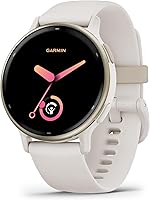
A screen, useful workout guidance and a charging routine you can maintain matter more than the category name. The Garmin vivoactive 5 42mm, Fitbit Charge 6 and screenless Fitbit Air show 3 different ways to fit tracking into your day.


Smartwatch vs fitness tracker: what’s the main difference?
A smartwatch puts information and tools on your wrist, while a fitness tracker centers on recording activity and sleep. Their features overlap, so neither label tells you everything a device can do.
Think about checking information versus collecting it. A display helps during an activity, while a screenless device suits someone who prefers to review progress later on a phone.
Trackers can include directions and payments, and smartwatches can offer detailed fitness guidance. Buying the broader category doesn't help if its extra tools go unused.
Write down the 3 tasks you want most, such as recording walks, checking messages or following workouts. Our guide to what to look for in a smartwatch helps turn that list into buying priorities.
Which one is better for daily use?
Choose a smartwatch if useful wrist interactions will save you time throughout the day. Choose a tracker if you mainly want a record of your activity without adding more screen time.
Notifications help when you need to spot an important message while your phone stays in a bag. They become less useful if every email, shopping alert and social update reaches your wrist.
A screenless tracker suits someone who already wears a regular watch or wants fewer reasons to check a device. Skip that design if you need to see the time or workout information at a glance.
Also consider where you'll wear it: under work sleeves, during chores and in bed. A device that catches on clothing or bothers you overnight can leave gaps in the very information you bought it to collect.
Which device is better for exercise?
Choose by how you exercise and what guidance you need. Recording a walk, following a training plan and checking live workout information are different jobs.
For casual walking and general movement goals, consistent wear matters more than a long menu of exercise modes. For running or cycling, decide whether you want route tracking without carrying a phone.
Built-in GPS records location through the device itself, while connected GPS uses your phone. Neither term guarantees that messages, directions or music will work without a phone connection.
Training guidance matters when you want help deciding what to do next. Workout plans and recovery estimates serve a different purpose from simply recording exercise time.
Gym users should check that the available exercise modes match their usual workouts. A long list of modes doesn't mean every activity includes detailed guidance.
If running is becoming your main sport, compare our Garmin watches for running. For a wider mix of workday and exercise needs, see our guide to smartwatches for everyday use.
How do battery life and charging compare?
Compare battery estimates for your intended settings, then decide when you'll charge. A tracker doesn't automatically outlast a smartwatch.
Garmin rates the vivoactive 5 for up to 11 days in smartwatch mode, or up to 5 days with its display always on. Fitbit Charge 6 has a 7-day battery estimate.
Fitbit Air has a 5-day estimate alongside Google Fitbit's claim of up to a week. Plan conservatively until you know how your routine affects its runtime.
Google Fitbit also claims up to a day of Air battery life from a 5-minute charge. That is a short top-up claim, not a full-charge time.
Long GPS sessions and frequent screen use can change how often a wearable needs power. Build a charging habit around a quiet desk period or another predictable break, especially if you want overnight records.
Avoid routinely waiting until the battery runs out. Our guide to smartwatch battery life explains how features and settings affect charging needs.
Which is better for sleep tracking and overnight comfort?
Choose the device you'll comfortably wear overnight and use consistently. Sleep summaries are most useful when you can compare them with your bedtime and waking routine.
Garmin vivoactive 5 offers a sleep score, sleep coaching and nap detection. Its companion app lets you review overnight records alongside your daily activity and workouts.
Fitbit Charge 6 includes a nightly Sleep Score and sleep tracking. Its Smart Wake alarm gives it another role in a morning routine.
Fitbit Air is designed for day and night wear and has a micro-adjustable band. Its screenless format means reviewing information on your phone rather than checking it in bed.
Look for patterns across several days instead of reacting to one score. Note changes in bedtime, exercise or travel so the numbers have context.
Compare how easily each app shows bedtime, waking time and overnight records. Also consider whether the band stays comfortable and when you'll charge without leaving gaps in sleep tracking.
For more devices centered on these goals, compare our fitness tracker guide.
Which of these 3 devices fits your routine?
Pick Garmin for guided exercise and wrist tools, Charge 6 for visible workout tracking, or Air for collecting information without a display. Each makes sense for a different daily habit.
Smartwatch vs fitness tracker: Garmin vivoactive 5 42mm
The Garmin vivoactive 5 42mm suits someone who wants a device that helps plan exercise as well as record it. Its AMOLED touchscreen also provides a place to check information throughout the day.
It includes more than 30 indoor and GPS sports apps, preloaded workouts, workout benefit information and recovery time estimates. Garmin Coach adds free adaptive running plans, while wheelchair mode tracks pushes and includes dedicated activities.
Stored music with wireless headphones supports phone-free listening, and paired notifications cover texts, emails and other alerts. Check the requirements of your chosen music service before planning your routine around downloads.
Skip it if you mainly want a quiet record of daily movement and won't use the training guidance. Those extra options create more to learn without helping a basic tracking routine.
Fitbit Charge 6 for regular exercise and quick checks
The Fitbit Charge 6 suits someone who wants to check workouts on a screen while keeping exercise at the center of the device. Its LCD touchscreen avoids the need to review every detail on a phone.
It combines 40+ exercise modes and built-in GPS with automatic exercise tracking. The range of modes gives you options for recording gym sessions and outdoor activities.
Google Maps directions and Google Wallet add practical daily tools. YouTube Music controls let you manage playback, but controls aren't the same as stored music.
Skip it if your main goal is phone-free listening from the wearable itself. Also look elsewhere if avoiding a wrist screen is the reason you're buying a tracker.
Fitbit Air for fewer wrist distractions
The Fitbit Air suits someone who wants tracking to stay in the background. Choose it when checking information later is preferable to seeing it throughout the day.
The micro-adjustable band fits wrists from 130 to 210 mm. Measure your wrist before ordering, and allow enough adjustment for a secure fit that doesn't pinch.
Its smartphone-based GPS makes it a better match for someone who already carries a phone on outdoor activities. A screenless design also leaves room for a traditional watch to remain your timepiece.
Skip Air if you want to glance at live workout information or leave your phone behind for GPS tracking. No display means you can't use it to check the time, either.
For more options by phone type, browse our best smartwatch for iPhone guide or best smartwatch for Android guide.
What should you check before buying?
Check phone support, feature dependencies and ongoing costs before choosing a device. A feature only helps if it works with the phone and services you intend to use.
Garmin vivoactive 5 supports Android and iOS devices. Fitbit Air supports Android 11.0 or higher and iOS 16.4 or higher; confirm Charge 6 requirements against your exact phone and operating system before ordering.
Personalized coaching through Google Health Premium requires a separate membership for both Fitbit trackers after the included 3-month trial. Decide whether you want that coaching before treating it as part of the long-term package.
Check payment support with your bank and any service requirements for music or directions. A supported feature name doesn't establish that every account, card or region will work.
Use this short checklist:
- Which 3 functions will you use every week?
- Do you want information on your wrist or only in a phone app?
- Will you carry your phone during outdoor exercise?
- Can you keep a regular charging window?
- Are the features you need included without a membership?
Our guide to whether smartwatches need a phone explains where phone connections still matter.
How should you set up a smartwatch or fitness tracker?
Start with a secure fit, a complete sync and a few useful settings. Adding every alert and goal at once makes it harder to see what helps.
Charge the device, install its companion app and follow the pairing steps. Review permissions individually so you understand which features need location access, notifications or background activity.
Enter your profile details carefully because activity estimates can depend on them. Set an achievable movement goal based on your normal routine before raising it.
Wear the band snugly enough to stay in place without digging into your skin. Follow the device's fit guidance, especially for exercise and overnight wear.
Start with only essential alerts, then add more if you miss something useful. If syncing becomes unreliable, our guide to why a smartwatch keeps disconnecting covers connection checks.
What care habits and mistakes matter most?
Keep skin, bands and charging contacts clean and dry, following the device's care instructions. A wearable needs regular attention because it spends hours against your skin.
After sweaty exercise, clean it as directed and let the band dry before putting it back on. Avoid harsh cleaners, and don't charge through moisture or visible residue.
Water resistance has limits that vary by device and activity. Check the exact guidance before swimming, showering or exposing a wearable to hot water.
The most common buying mistake is paying for features you like reading about but won't use. Another is assuming that more exercise modes mean better guidance for your particular sport.
Once you start wearing it, avoid chasing every calorie estimate or changing your workout because of one readiness score. Use trends alongside your schedule, effort and how you feel.
The simple rule for smartwatch vs fitness tracker
For the smartwatch vs fitness tracker decision, choose Garmin vivoactive 5 if you'll use guided workouts, stored music and paired notifications. Choose Fitbit Charge 6 if checking exercise on your wrist matters, or Fitbit Air if keeping screens out of your routine comes first.
If you still can't name a weekly task the device would help with, keep using your current routine before buying. If tracking is the clear priority, our fitness tracker picks are the next comparison to make.
Frequently asked questions
Is a smartwatch better than a fitness tracker?
A smartwatch is better when you'll regularly use notifications, stored music or other wrist tools alongside exercise tracking. A fitness tracker suits a more focused activity routine.
Compare individual models: a tracker can still offer GPS, directions and payments, while a smartwatch can also have long battery life.
Can a fitness tracker replace a smartwatch?
Yes, if its features cover the tasks you actually use. Someone who mainly checks workouts and daily movement may need little else.
A screenless tracker cannot replace a watch display, though, and music controls are different from storing music for phone-free listening.
Write down your essential tasks before switching.
Do fitness trackers last longer on a charge?
Not automatically; the exact device and settings matter more than the category. Display behavior, GPS sessions and other active features affect charging needs.
Compare battery estimates for the mode you plan to use, then choose a regular charging window that won't interrupt workouts or leave gaps in overnight tracking.
Do you need your phone to use a fitness tracker?
Expect to use a compatible phone for setup, syncing and reviewing information. GPS needs vary: Fitbit Air uses smartphone GPS, while Fitbit Charge 6 has built-in GPS.
A built-in receiver doesn't make every feature independent of your phone.
Our guide explains whether smartwatches need a phone.