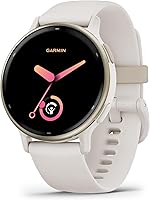
6 Best Smartwatches for Women (October 2026)
The best smartwatches for women include the Apple Watch SE 3 GPS 40mm for everyday iPhone users, the Garmin vivoactive 5 42mm for busy fitness routines, and the Samsung Galaxy Watch 8 40mm for Samsung phone users.
On this page (9 sections)
- Which smartwatch for women fits your routine?
- The best smartwatches for women
- How do you choose a smartwatch size and fit?
- Which phone should your smartwatch work with?
- What everyday and fitness features are worth comparing?
- How much battery life do you need?
- How should you set up and care for your smartwatch?
- What mistakes should you avoid before buying?
- Which smartwatch for women should you choose?
The best smartwatch for women with an iPhone is the Apple Watch SE 3 GPS 40mm for everyday communication, workout tracking and safety tools. Garmin is the stronger starting point for fewer charging breaks or a smaller case, while Samsung suits Android users who want coaching.
Start with your phone and the watch you'll comfortably wear all day. Then decide whether your priority is handling messages, following workouts, recording outdoor routes or keeping a consistent sleep log.
For a wider overview, read our complete guide to smartwatches for everyday use. You can also compare smartwatches for iPhone or smartwatches for Android phones.
Our picks at a glance
-
1

-
2

-
3

Which smartwatch for women fits your routine?
Choose by your main daily task: iPhone communication, exercise guidance, fewer charging breaks or a compact fit. A watch that handles your top priority comfortably is more useful than one with extra features you rarely open.
WeekdayWise compared phone support, case size, sleep tracking, activity guidance and battery estimates. The order reflects those features and their fit for everyday use; your phone or wrist size can make a lower-ranked pick the better choice.
Use the comparison to narrow the group to 2 watches. Read their setup needs and reasons to skip them before deciding.
| Product | Best for | Our score |
|---|---|---|
| Apple Watch SE 3 GPS 40mm | everyday iPhone users | 9.1 |
| Garmin vivoactive 5 42mm | busy fitness routines | 8.7 |
| Samsung Galaxy Watch 8 40mm | Samsung phone users | 8.3 |
| Garmin vivoactive 6 42mm | guided exercise routines | 7.7 |
| Garmin Lily 2 35mm | compact everyday wear | 7.3 |
| Garmin Lily 2 Active 38mm | phone-free route tracking | 6.9 |
The best smartwatches for women
The SE 3 leads for everyday iPhone use, while the Garmin and Samsung options serve different fitness, fit and charging needs. Each recommendation below includes the buyer it suits and the trade-off that could rule it out.
Apple Watch SE 3 GPS 40mm: Our top smartwatch for women with iPhones
Apple Watch SE 3 GPS 40mm: Best for everyday iPhone users
- 40mm GPS model
- Workout and sleep tracking
- Up to 18 hours of battery life
- Customizable faces and bands
Choose the SE 3 for iPhone calls, texts, workout tracking and safety tools. Plan a regular charging window if you also want to wear it overnight.
Pros
- Workout tracking and sleep score
- Hard fall and severe car crash detection
- Fast charging
Cons
- Connected features depend on an iPhone or Wi-Fi
- Frequent charging needs planning for overnight wear
Choose the SE 3 if you want your watch to handle calls, texts and notifications alongside exercise tracking. The GPS model works with an iPhone or Wi-Fi for connected tasks, so don't mistake GPS in its name for an independent cellular connection.
It offers workout tracking and a sleep score, so you can keep exercise sessions and overnight records in one place. Running and strength workouts get real-time metrics, making this a practical choice for someone who wants communication and fitness on the same wrist.
Hard fall and severe car crash detection can help connect you with emergency services and alert emergency contacts. Set those contacts during setup so the safety tools are ready when needed.
Apple states up to 18 hours of battery life, with up to 8 hours from a 15-minute fast charge. If overnight tracking matters, build charging into a shower or another predictable break.
Skip it if your main goal is several days between charges or you use Android. If fit is the deciding factor, our guide to choosing an Apple Watch size helps you assess the case and band together.
Garmin vivoactive 5 42mm: Fewer charging breaks for mixed activities
Garmin vivoactive 5 42mm: Best for busy fitness routines
- Up to 11 days in smartwatch mode
- AMOLED display
- Sleep tracking and music storage
- More than 30 sports apps
The vivoactive 5 suits mixed exercise routines and people who want fewer charging breaks. Its wheelchair mode adds push tracking and related activities.
Pros
- Sleep coaching and nap detection
- Wheelchair mode
- Music storage
Cons
- Larger case than the Lily models
- Always-on display reduces stated battery life
The vivoactive 5 suits someone who alternates between walks, gym sessions and other activities without wanting a daily charging task. Garmin states up to 11 days in smartwatch mode, dropping to 5 days with its AMOLED display always on.
Its more than 30 indoor and GPS sports apps include running, cycling, swimming and golf. Preloaded workouts and Garmin Coach plans add structure when recording an activity alone isn't enough.
Wheelchair mode tracks pushes rather than steps and includes push and handcycle activities. That makes this a useful starting point for wheelchair users comparing the options in this group.
Sleep coaching and nap detection keep overnight records and daytime naps together. Music storage also lets you download supported playlists and listen through wireless headphones without carrying your phone for playback.
Choose it for a mix of fitness tools and fewer charging interruptions, with Android or iOS support. Skip it if you want the smallest watch or specifically want animated exercise guidance and daily walking suggestions.
Our Apple Watch vs Garmin daily-use comparison helps if communication features and fitness habits are pulling you in different directions.
Samsung Galaxy Watch 8 40mm: Sleep and running guidance for Android
Samsung Galaxy Watch 8 40mm: Best for Samsung phone users
- 40mm case
- Sleep coaching and bedtime guidance
- Outdoor Running Coach
- Android phone compatibility
Choose the Galaxy Watch 8 for sleep and running guidance with an Android phone. A compatible Samsung Galaxy phone is required for Galaxy AI features.
Pros
- Sleep and bedtime guidance
- Running Coach programs
- At-a-glance updates
Cons
- Android phone required
- Some coaching and AI features have extra setup requirements
Choose the Galaxy Watch 8 if you use Android and want coaching prompts to shape your routine. It pairs through Galaxy Wearable and Samsung Health, but Galaxy AI features require a compatible Samsung Galaxy phone, Samsung Health and a Samsung account.
Advanced Sleep Coaching and Bedtime Guidance suit someone trying to establish a regular bedtime. Bedtime Guidance needs 3 consecutive nights of wear and an optimal wake-up time set in Samsung Health.
Running Coach offers real-time feedback and programs for distances such as 5Ks and marathons. It is for outdoor running and needs initial setup plus at least 12 minutes of running with GPS on.
That makes it a better match for outdoor runners than someone whose exercise is entirely on a treadmill. At-a-glance updates also require account sign-ins and an internet connection.
Skip it if you use an iPhone or want all advertised AI tools with a phone that doesn't meet their requirements. For a non-Samsung Android phone, confirm the exact features you want before buying.
Our guide to the best smartwatches for Android phones offers a wider comparison if those requirements narrow its appeal.
Garmin vivoactive 6 42mm: Help choosing and following workouts
Garmin vivoactive 6 42mm: Best for guided exercise routines

- Up to 11 days in smartwatch mode
- More than 80 sports apps
- Daily suggested walking workouts
- Animated exercise guidance
The vivoactive 6 suits people who want help choosing and following workouts. Walking suggestions and animated sessions give its broad activity menu a clear purpose.
Pros
- Sleep coaching and nap detection
- Smart wake alarm
- Supports Android and iOS phones
Cons
- Larger case than the Lily models
- Broad activity menu may be unnecessary for basic tracking
The vivoactive 6 is the better fit if you want your watch to suggest movement and guide exercise sessions. Its daily suggested walking workouts give walkers a reason to choose it beyond the size of its activity menu.
More than 80 built-in indoor and GPS sports apps cover options including mobility, cycling and swimming. Animated workouts for cardio, yoga, strength, HIIT and Pilates add visual guidance while you exercise.
Garmin Coach plans add structure to a regular training schedule. Workout records can also help you review how sessions fit into your week, with a clearer view of the activities you have completed.
Garmin states up to 11 days in smartwatch mode. Sleep coaching, nap detection and a vibrating smart wake alarm extend its role beyond exercise, while paired notifications support everyday use with Android and iOS phones.
Choose it if you will open the guidance tools regularly. Skip it if you mainly want steps and messages, or if a larger case would discourage overnight wear.
For other priorities within the brand, our Garmin watch guide helps narrow the choices.
Garmin Lily 2 35mm: A compact watch for everyday tracking
Garmin Lily 2 35mm: Best for compact everyday wear
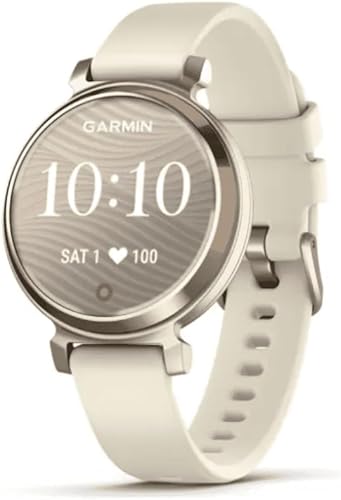
- 35mm case
- Up to 5 days of battery life
- Patterned lens reveals touchscreen
- Phone-connected GPS
The Lily 2 suits someone who wants a small watch for daily activity tracking and notifications. Bring a compatible phone for GPS tracking of outdoor routes.
Pros
- Smallest case in this group
- Sleep and activity tracking
- Move alerts include movement options
Cons
- GPS requires a compatible phone
- Shorter battery estimate than the other Garmin picks
Choose the Lily 2 if a small case matters more than independent route tracking. Its 35mm metal case is the smallest here, and its patterned lens reveals a touchscreen with a tap.
It covers everyday activity and sleep tracking, including a sleep score for reviewing overnight records. Activity options include yoga, Pilates, cardio and dance fitness, giving you several ways to log your usual sessions.
Move alerts include movement options, which suit someone who wants reminders to break up a desk day. Paired notifications bring incoming calls, texts and calendar reminders to your wrist.
The main compromise is phone-connected GPS. Bring your compatible smartphone to record outdoor walks and runs using its GPS; this is less suitable if leaving the phone behind is central to your routine.
Garmin gives it an estimate of up to 5 days between charges. Choose it for compact daily wear, and skip it if onboard route recording is a must.
If a small wearable is your main goal, our best fitness trackers guide gives you another type of device to consider.
Garmin Lily 2 Active 38mm: Outdoor routes without a large case
Garmin Lily 2 Active 38mm: Best for phone-free route tracking

- 38mm case
- Built-in GPS
- Up to 9 days of battery life
- On-screen workouts
Choose the Lily 2 Active for outdoor route tracking in a smaller case. Built-in GPS records activities without borrowing your phone's GPS.
Pros
- Smaller case than the vivoactive models
- Garmin Coach training plans
- Garmin Pay with supported countries and payment networks
Cons
- LCD rather than AMOLED display
- Smart notifications still require smartphone pairing
The Lily 2 Active suits someone who likes the Lily style but wants built-in GPS for outdoor walks and runs. Its 38mm case remains smaller than the vivoactive options, with 2 buttons alongside the touchscreen.
Garmin states up to 9 days of battery life. The watch adds on-screen strength, HIIT and yoga workouts, plus Garmin Coach plans for a 5K, 10K or half-marathon.
Everyday features include sleep tracking, a sleep score and paired calendar reminders for keeping up with your routine. Garmin Pay supports contactless payments where the country and payment network allow it.
Choose this model if compact fit and route recording matter more than having the broadest activity menu. Its LCD is another reason to compare the screen with the AMOLED vivoactive options if display preference matters to you.
Skip it if you want the smallest possible case or mainly want the vivoactive 6's walking suggestions and animated workouts. Built-in GPS also doesn't make this a standalone communication device: call, text and calendar notifications still rely on smartphone pairing.
How do you choose a smartwatch size and fit?
Choose a case and band you can comfortably wear during your normal day and overnight. A watch that looks right but presses against your wrist or slides around will be harder to use consistently.
Start with wrist fit, then screen size
Measure your wrist where the band will sit and compare that measurement with the band's supported range. Total band length doesn't necessarily tell you the smallest wrist it can fit.
The case should sit securely without hanging awkwardly over the sides of your wrist. Bend your wrist back as you would when typing, doing a plank or pushing open a door, and consider where the case edge would press.
A smaller watch can feel less bulky, but a larger screen may be easier to read. Don't choose only by appearance if small text or precise taps are difficult for you.
Match the fit to your daily activities
Follow the manufacturer's fit instructions and choose a band adjustment that feels secure and comfortable. Consider whether the clasp or case gets in the way during typing, exercise or overnight wear.
Check replacement-band compatibility before choosing a watch for its styling options. Width, attachment type and adjustment range all matter, especially if you plan to switch between exercise and dress bands.
Which phone should your smartwatch work with?
Match your watch to your exact phone before comparing optional features. Basic pairing, notifications, AI tools and internet features can have different requirements, even on the same watch.
Choose the SE 3 for iPhone use; both vivoactive models support Android and iOS. Samsung's Android support is broader than its Galaxy AI support, so a successful pairing doesn't establish access to every feature.
Both Lily models pair with compatible smartphones for notifications. Confirm your phone model and software support, particularly if you expect to keep an older phone for several more years.
If you use Android, our guide to using an Apple Watch with Android explains the compatibility limits. For Garmin, see whether Garmin watches work with iPhone.
Treat GPS and communication as separate decisions. A watch can record an outdoor route without a phone yet still need that phone for messages, internet services or safety features.
What everyday and fitness features are worth comparing?
Choose everyday tools you will use consistently and workout guidance that matches your activities. A longer feature list adds little if the watch is uncomfortable at night or its coaching serves a sport you don't do.
Use sleep logs to review your routine
Sleep logs can keep overnight records together alongside your usual bedtime and wake-up schedule. Review account privacy, sharing permissions and notification previews before entering information you consider sensitive.
A consistent sleep log is easier to review when you wear the watch on ordinary nights. Note travel, late evenings or changes in your schedule so the records have useful context.
Compare how each app presents sleep duration, bedtime and overnight records. Clear summaries and comfortable overnight wear may matter more to your routine than extra charts you rarely open.
Match coaching to how you exercise
A walker may get more use from suggested walking sessions than a large collection of sports modes. Someone doing home workouts may value on-screen guidance, while an outdoor runner may want a structured distance plan.
Compare how easily you can start, follow and review your usual workouts. Clear prompts, readable screens and convenient controls can make familiar sessions easier to record.
Decide whether you'll carry your phone outdoors
Choose built-in GPS if recording routes without borrowing your phone's GPS is a priority. Connected GPS is practical if you already carry your phone for music, contact or reassurance.
For any GPS watch, finish setup and allow it to establish a location before starting an outdoor activity. Check safety-feature requirements separately, since route recording and sending a location to another person require different connections.
How much battery life do you need?
Choose enough battery flexibility to protect the tracking you care about most. If sleep is your priority, a charging plan that keeps the watch off your wrist all night defeats the purpose.
The brand estimates above describe particular usage conditions, not fixed intervals for every wearer. Display settings, GPS sessions and other active features affect how often you need to recharge.
An always-on display is worth choosing only if seeing the time without waking the screen matters enough to you. Start with your preferred settings, then adjust them if charging becomes inconvenient.
For frequent travel, consider where you'll pack the charging cable and when you'll have access to power. A longer battery estimate is useful, but a forgotten cable can still interrupt your routine.
Our guide to how long smartwatch batteries last explains how to plan around different usage patterns.
How should you set up and care for your smartwatch?
Set up the essentials first, then add features as you need them. A quiet, readable watch with reliable pairing is a better starting point than a wrist full of alerts.
Make the first week useful
- Pair and finish setup. Use the required companion app, review permissions and install available software updates before relying on connected features.
- Limit notifications. Start with calls, calendar alerts and messages you need promptly; add other apps only when wrist alerts help.
- Set a readable face. Keep the time and your most useful information easy to see instead of filling every space.
- Configure activity tools deliberately. Choose your usual workout shortcuts, review privacy choices and enable only the reminders you want.
- Complete safety setup. Where supported, add emergency contacts and learn which features need your phone, network coverage or manual activation.
- Plan charging. Pick a regular window that avoids the workouts or overnight records you most want to keep.
Give sleep and activity tools time to build a record of your normal week before comparing entries. Some features also need their own setup period, as with Samsung's bedtime and running guidance.
Keep the band, case and charger clean
Follow the manufacturer's cleaning instructions, especially after sweat or sunscreen builds up. Dry the watch, band and charging contacts as directed before reconnecting power.
Check the band's adjustment and clasp during your usual activities. A band that feels comfortable at a desk may need a different adjustment for exercise or overnight wear.
Check the model's care and water-use instructions before showering, swimming or exposing it to soap. A sports mode alone doesn't establish every condition in which the watch can safely be used.
What mistakes should you avoid before buying?
Avoid choosing by appearance or the biggest feature count alone. The most costly mismatch is a watch that conflicts with your phone, comfort needs or charging habits.
- Confusing notifications with calls. Seeing an incoming-call alert doesn't establish that you can hold a conversation through the watch.
- Assuming built-in GPS means full independence. Route recording doesn't automatically include messaging, music access or emergency connectivity.
- Buying for one ambitious goal. Choose for your normal week, then consider the occasional race or new exercise plan.
- Ignoring setup conditions. Account, phone, internet and activity requirements can determine whether a feature is useful to you.
- Overlooking everyday controls. Check how you start workouts, read messages and dismiss alerts before choosing by the feature list.
- Planning to tolerate poor fit. A watch you regularly remove for comfort will leave gaps in the records you bought it to collect.
Before ordering, write down your phone, preferred fit, top 3 tasks and charging window. Use that short list to rule out mismatches before weighing optional extras.
Which smartwatch for women should you choose?
Choose the best smartwatch for women by the compromise you're willing to make. Set phone compatibility and comfortable fit first, then decide which daily benefit earns space on your wrist.
Pick the Apple Watch SE 3 for iPhone communication and everyday tracking if you can maintain a regular charging routine. Pick the vivoactive 5 for varied activities and fewer charging breaks, or the Galaxy Watch 8 for Android coaching after checking feature requirements.
Choose the vivoactive 6 when walking suggestions and guided exercise will shape your week. Choose the Lily 2 when compact wear matters most, or the Lily 2 Active when you want a smaller watch with onboard outdoor route recording.
Read our complete everyday smartwatch guide if another daily-use priority still needs a closer comparison.
Our top 3 picks at a glance
-
1
-
2
-
3
Frequently asked questions
What should you look for in a smartwatch for women?
Start with phone compatibility, comfortable fit and a charging routine you can maintain. Then choose the everyday features and workout guidance you will actually use.
For outdoor route tracking, decide whether you will carry your phone, since connected GPS and built-in GPS serve different routines.
Which smartwatch here has the longest battery life?
Garmin gives the vivoactive 5 and vivoactive 6 the longest estimates here, at up to 11 days in smartwatch mode. The vivoactive 5 estimate falls to 5 days with its display always on.
Compare settings as well as headline figures, since your use affects time between charges.
Which features are useful for everyday activity tracking?
Compare step logs, workout modes and sleep tracking against your normal routine. The Garmin models offer different combinations of sports apps, route recording and exercise guidance, while the Apple Watch SE 3 combines workout tracking with iPhone communication.
Choose features you will open regularly, and check whether they require your phone or extra setup.
Which smartwatch is best for a small wrist?
The Garmin Lily 2 has the smallest case here, making it the first option to consider if larger watches feel bulky. The Lily 2 Active adds built-in GPS in a slightly larger case.
Check band adjustment, screen readability and how the case sits against your wrist before choosing.
Do you need an iPhone for the Apple Watch SE 3?
Choose the Apple Watch SE 3 for use with an iPhone. Its Wi-Fi connectivity does not make it an Android choice, and this GPS model should not be confused with a cellular version.
Android users should compare compatible Garmin options and our smartwatches for Android phones.