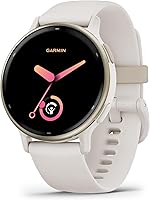
How to Choose an Easy-to-Use Smartwatch for Seniors
The best smartwatch for seniors is one they can read, wear and charge comfortably with their current phone. Choose Apple Watch SE 3 for an iPhone user who wants fall detection, Garmin vivoactive 5 for fewer charging sessions, or Galaxy Watch 8 for an Android user interested in sleep coaching.
On this page (9 sections)
- What makes a smartwatch easy for seniors to use?
- Which phone does the smartwatch need to work with?
- Which of these smartwatches suits the wearer?
- Which smartwatch features may help with safety?
- How should seniors plan smartwatch charging?
- How do you set up a smartwatch for a senior?
- How should you care for a smartwatch and its band?
- What mistakes should you avoid when choosing a smartwatch for seniors?
- Which smartwatch should you choose for a senior?
The best smartwatch for seniors is one that works with their phone and fits their daily routine. Start with readable screens, manageable controls and charging, then choose the activity or safety features the wearer actually wants.
Apple Watch SE 3 suits iPhone users who want fall detection, Garmin vivoactive 5 suits people who want longer gaps between charges, and Galaxy Watch 8 suits Android users interested in sleep coaching.
Age alone does not decide the right watch. Someone who enjoys phone apps may want several wrist tools, while another person may only want the time, incoming alerts and a record of daily walks.
For a broader comparison before narrowing your choices, see our complete guide to smartwatches for everyday use.
What makes a smartwatch easy for seniors to use?
An easy smartwatch puts a few clear tasks within reach. The wearer should be able to read the time, find a useful alert and return to the main screen without memorizing a long sequence.
Choose around the person’s habits rather than someone else’s idea of what a senior needs. Ask which phone tasks feel comfortable now and which ones cause trouble.
If small phone buttons are difficult, a wrist screen deserves extra attention. Voice help may be useful where available, but it should not be the only way the person can complete an everyday task.
Check the tasks the wearer will repeat
Try reading a message, dismissing an alert and finding the battery level. These small actions reveal more about ease of use than a screen filled with colorful charts.
Check the controls while seated and while standing, using the wearer’s usual glasses. A watch that looks clear under bright store lights may need different settings at home.
Keep the watch face simple, with a clear time display and only the information the wearer needs. Extra weather, activity and sleep details can go elsewhere if they make the main screen crowded.
Is a bigger smartwatch screen better for seniors?
A larger watch is worth comparing for readability, but case size is only a starting point. Text settings, layout and the amount of information on each screen also affect how easy it is to read.
Check menus and messages as well as the clock face. A large time display does not help much if the wearer cannot read the smaller text needed to change a setting.
For more help comparing Apple’s size options, use our Apple Watch size guide.
Check the band as carefully as the screen
The wearer needs to fasten and remove the band without a struggle. Practice the clasp motion, especially if small fasteners are difficult to handle.
The watch should stay in place without pinching. Check comfort when bending the wrist, wearing long sleeves and resting an arm on a table.
Which phone does the smartwatch need to work with?
Match the watch to the wearer’s current phone first. Basic pairing and access to every advertised feature are separate checks.
The Apple options here are for iPhone users, Garmin supports Android and iOS devices, and Samsung Galaxy Watch 8 pairs with Samsung and other Android phones. Confirm the exact phone’s compatibility before ordering.
Some of Samsung’s Galaxy AI features have narrower requirements: a compatible Samsung Galaxy phone, the Samsung Health app and a Samsung account. Basic Android compatibility does not mean every feature works on every Android phone.
Avoid choosing a watch that requires a phone change unless the wearer already wants one. Learning a new phone and a new watch together adds work to setup and daily use.
For more options within the right phone group, see our guides to smartwatches for iPhone and smartwatches for Android.
Which of these smartwatches suits the wearer?
Choose Apple for its stated fall detection, Garmin for charging less often, or Samsung for Android sleep tools. Then compare fit and the work needed to keep the chosen features useful.
Apple Watch SE 3 GPS 40mm: for a smaller case preference
The 40mm SE 3 is the Apple option to consider when the wearer prefers a smaller case. It offers customizable faces, so setup can focus on a clear clock and a few useful shortcuts.
Apple says SE 3 can detect a hard fall or severe car crash, help connect with emergency services and notify emergency contacts. That makes it a relevant choice for an iPhone user who specifically wants those safety functions.
It also supports calls, texts and notifications through its connection, plus workout and sleep tracking. Start with the functions the wearer values instead of turning on every alert.
Choose this size if its screens are readable and the smaller case feels more comfortable. Skip it if messages or controls remain hard to use after adjusting the available settings.
Apple Watch SE 3 GPS 44mm: for comparing a larger fit
The 44mm SE 3 gives an iPhone user a larger size option with the same core features. Compare it directly with the 40mm version rather than assuming larger will always be easier.
Choose it if the wearer prefers how information appears on this size and can comfortably reach the controls. Check that the case does not press into the hand when the wrist bends.
The shared sleep tools include sleep tracking and a sleep score for reviewing nightly records. Compare how easily the wearer can find those records and whether the larger case stays comfortable overnight.
Skip the larger size if it feels bulky or moves around on the wrist. Neither GPS model is the right choice for someone expecting independent cellular service from these particular versions.
Garmin vivoactive 5 42mm: for fewer charging sessions
Garmin vivoactive 5 suits someone who wants activity and sleep information without planning a charge every day. Its Android and iOS support also makes it worth considering in either phone group.
Garmin says battery life reaches up to 11 days in smartwatch mode, or 5 days with the display always on. Those are maximum figures, so leave room in the routine for use that shortens them.
The AMOLED display, sleep coaching and automatic nap tracking suit someone interested in daily habits. Check whether the wearer finds the sleep summaries easy to read and wants to wear the watch overnight.
Its wheelchair mode tracks pushes instead of steps and includes relevant activities and workouts. That is a more useful reason to choose it for a wheelchair user than a general step-count goal.
Choose Garmin for longer battery life and activity guidance. Skip it if your main buying reason is the specific automatic emergency features described for the Apple options; make safety requirements a separate check.
Samsung Galaxy Watch 8 40mm: for Android sleep routines
Galaxy Watch 8 suits an Android user who wants sleep coaching and help building a regular bedtime routine. It is a stronger fit when the wearer has the compatible Samsung phone needed for the desired Galaxy AI features.
Samsung’s Bedtime Guidance requires 3 consecutive nights of wear and a wake-up time set in Samsung Health. Choose it for someone willing to wear a watch at night and keep the setup consistent.
Sleep and activity summaries give the wearer daily records to browse in the app. Check whether those screens are easy to find and whether the wearer prefers a simple summary or more detail.
Review which sleep and fitness features work with the wearer’s exact phone and software. Confirm availability and setup requirements before buying for a particular app feature.
Skip this watch for an iPhone user or someone who wants no ongoing app setup. Sleep coaching is also a poor buying reason if the wearer does not want to wear a watch overnight.
Which smartwatch features may help with safety?
Separate emergency contact tools from everyday activity tracking. Fall detection can help start a call for assistance, while sleep records and activity summaries serve a different purpose.
For the Apple safety features described above, check setup and connection requirements before relying on them. Detection and a successful connection are not guaranteed after every incident.
These SE 3 GPS models use an iPhone or Wi-Fi to stay connected. Do not assume that built-in GPS means a watch can make calls anywhere without another connection.
Talk through situations such as a walk without the phone or time spent outside Wi-Fi coverage. Our Apple Watch GPS vs cellular guide explains the connection choice in more detail.
Agree on who belongs in the emergency contacts and keep their details current. Practice finding relevant safety settings without placing an unnecessary emergency call.
A smartwatch should fit within a wider help plan, including an accessible phone or another suitable way to contact assistance. Make sure the wearer knows which connection each contact tool needs.
How should seniors plan smartwatch charging?
Choose a charging schedule and charger the wearer can manage independently. Battery life matters, but removing the band, lining up the charger and remembering to put the watch back on matter too.
Apple says SE 3 provides 18-hour battery life and up to 8 hours of battery from 15 minutes of charging. That favors a planned daily top-up, especially if the wearer also wants overnight sleep tracking.
Garmin’s longer stated runtime reduces charging frequency, but occasional charging can be easier to forget. Use a recurring reminder and check the battery before an overnight trip or a long day away.
Samsung describes Galaxy Watch 8 as suitable for daily use, but no precise runtime is given here. Do not base the decision on an assumed number of days between charges.
Place the charger somewhere visible, stable and easy to reach. Make sure the wearer can tell that charging has started before walking away.
If overnight tracking matters, pick a waking routine such as time spent reading for charging. If the watch comes off every night, a bedside routine may be easier to remember.
Our guide to smartwatch battery life explains how settings and use affect the gap between charges.
How do you set up a smartwatch for a senior?
Start with the wearer’s top 3 tasks and add features gradually. A focused first setup gives them a chance to learn without constant interruptions.
- Pair it with the wearer’s phone. Complete the required account setup and keep recovery details somewhere secure.
- Make the main screen readable. Choose a clear face and adjust available text and display settings.
- Limit notifications. Begin with important calls, messages and reminders rather than every phone app.
- Set up chosen safety tools. Review emergency contacts, permissions and connection needs together.
- Practice everyday actions. Have the wearer read an alert, return to the clock and check the battery.
- Practice charging. Let them remove the watch, connect it and confirm charging has begun.
The wearer should perform those steps while a helper is still available. Watching someone else do them is less useful than repeating them independently.
Write a short reminder card if needed, using the same words shown on the screen. Include the charging routine and the helper’s contact details rather than a long menu guide.
Agree on privacy before enabling any activity sharing. Help with setup should not mean sharing passwords or personal information more widely than the wearer wants.
After a few days, remove alerts they keep dismissing and review any task they avoid. Add another feature only when it solves a real need.
How should you care for a smartwatch and its band?
Keep the contact surfaces clean and follow the model’s care instructions. Dirt, moisture and a poorly fitted band can make daily wear uncomfortable.
Wipe the watch and band as directed, and let them dry before putting the watch back on. Avoid household cleaners or soaking unless the manufacturer specifically allows them.
Check the band’s fit during daily removal. Follow the manufacturer’s fit instructions and make sure the closure remains easy to fasten and release.
Inspect the band closure and charging cable for damage. A worn fastener risks losing the watch, while a damaged cable can disrupt the charging routine.
Do not assume an activity mode makes every kind of water exposure suitable. Check the watch’s water-use instructions before swimming, showering or cleaning it under running water.
What mistakes should you avoid when choosing a smartwatch for seniors?
Avoid buying for impressive features that the wearer cannot use or maintain. The most useful watch is the one that stays charged, comfortable and familiar.
Choosing only by case size
A larger case does not guarantee readable menus or easy controls. Compare the actual tasks that matter, then check whether the watch still fits comfortably.
Turning on every alert
Too many notifications make important messages harder to spot. Keep the initial setup quiet, then add alerts when the wearer asks for them.
Buying for a sleep score alone
A sleep score is only one part of the watch’s everyday usefulness. Compare readable sleep records, overnight comfort and charging needs before choosing for sleep tracking.
Forgetting the phone connection
Some functions depend on the phone, an account or a network connection. Check what will work during the wearer’s usual day, including time spent away from the phone.
Making the helper essential for every task
A family member can handle the first setup, but everyday use should stay within the wearer’s comfort level. Choose something simpler if routine tasks still require repeated help.
If calls and apps are not wanted, a fitness tracker may fit better. Our smartwatch vs fitness tracker guide explains the main differences.
Which smartwatch should you choose for a senior?
Choose a smartwatch for seniors by its most useful job, then confirm fit and charging. Use these decision rules to narrow the choice:
- Choose Apple Watch SE 3 GPS 40mm for an iPhone user who wants Apple’s fall detection and prefers the smaller case.
- Choose Apple Watch SE 3 GPS 44mm when the larger option is easier for that wearer to read and remains comfortable.
- Choose Garmin vivoactive 5 42mm when fewer charging sessions, activity tracking or wheelchair-focused tools matter most.
- Choose Samsung Galaxy Watch 8 40mm for an Android user interested in sleep coaching who meets the requirements for the features they want.
Before ordering, have the wearer name the tasks they expect to use and explain when they will charge the watch. If either answer is unclear, simplify the plan before adding more features.
Use our smartwatch feature checklist to make the final choice around those daily tasks.
Frequently asked questions
What should seniors look for in a smartwatch?
Start with phone compatibility, readable text, comfortable controls and a charging routine the wearer can manage. Then choose a few useful functions, such as seeing calls, tracking walks or fall detection, and check their requirements.
A watch with fewer distractions can be more useful than one packed with unwanted features.
Can a smartwatch call for help after a fall?
Apple says SE 3 can detect a hard fall and automatically help connect with emergency services and notify emergency contacts. Set up the feature and check its connection requirements before relying on it.
Keep another way to get help available, because a watch cannot guarantee detection or contact after every incident.
Do seniors need a smartwatch with cellular service?
Cellular service is worth considering when the wearer needs calls or messages away from their phone, but it is not necessary for everyone. Compare coverage, phone compatibility and any service plan before choosing.
The Apple Watch SE 3 models here are GPS versions that use an iPhone or Wi-Fi to stay connected.
Which smartwatch is easiest to charge?
The easiest choice combines a charger the wearer can handle with a schedule they can remember. Garmin vivoactive 5 reduces charging frequency with up to 11 days in smartwatch mode.
Apple Watch SE 3 offers fast top-ups, but the wearer still needs a regular charging routine and a suitable place for the charger.
Is a bigger smartwatch easier to read?
A bigger watch is worth comparing, but case size alone does not tell you whether its text will be readable. Check the actual screens the wearer needs, including messages and menus, with their usual glasses.
Also check wrist comfort, because a larger case can feel awkward on a smaller wrist.
Can a family member help set up the watch?
Yes, a family member can help pair the watch, adjust readable text settings, choose useful alerts and check emergency contacts. Let the wearer practice the same tasks before finishing.
Keep account recovery details somewhere secure and agree on any activity information sharing, so help does not mean giving up privacy.